Packaging website mockups
Combine approved interface exports into a page-by-page review packet while keeping interactive prototypes and source assets elsewhere.
Drop files here
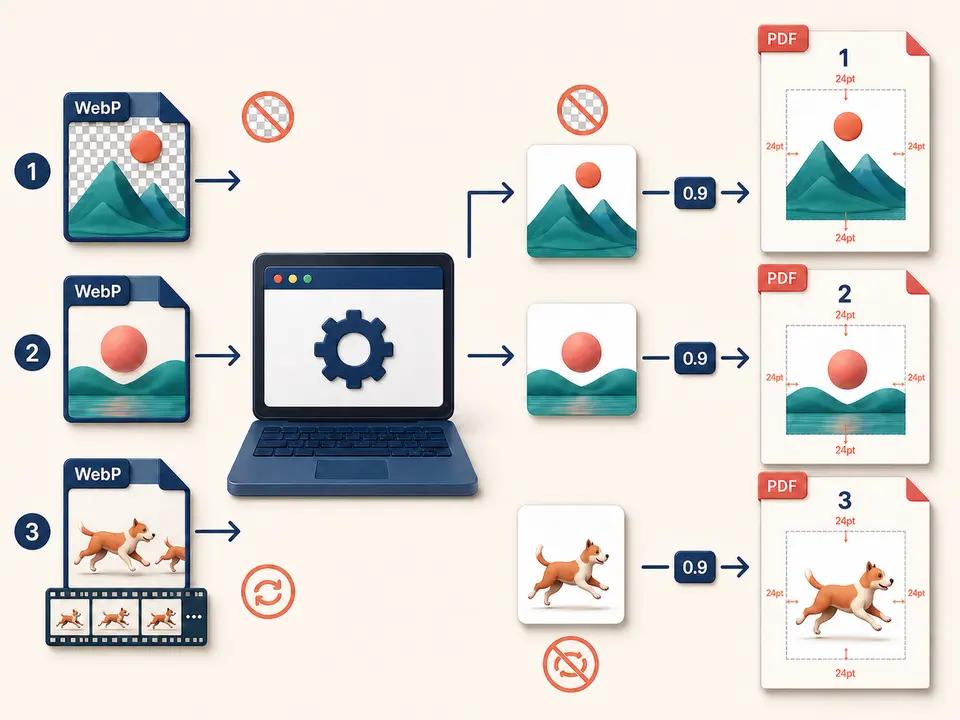
Convert WebP to PDF when modern web graphics need a conventional page document. TiPDF decodes each selected image locally, composites it on white and places it on a separate portrait A4 page.
The WebP to PDF converter validates the ordered selection and uses createImageBitmap when available, with an Image-element fallback. A successful decoder supplies pixel width, height and one drawable image. WebP to PDF creates a matching canvas with alpha disabled, paints it white and draws the source over that background.
WebP to PDF exports the canvas as JPEG at quality 0.9. The document therefore contains a new lossy image representation, not the original WebP stream. Lossless input, alpha data, animation and container metadata are not retained as corresponding PDF features.
One WebP to PDF source creates one portrait A4 page with a 24-point margin. Aspect ratio stays intact, large images shrink to fit and small images are not enlarged. Pages follow selection order and are written into one downloadable artifact.
WebP to PDF accepts one to 100 .webp files, each no larger than 100 MiB. A content signature must identify WebP data; changing an extension cannot bypass validation. Browser support must cover the encoded variant, and malformed containers or decode errors stop processing instead of creating a partial file.
Every WebP to PDF canvas is limited to 80 million pixels, while the complete job is limited to 250 million. These are post-decode safeguards. A compact web graphic can expand into substantial RGBA memory, so file size alone does not predict success. Width and height must also be valid for canvas allocation.
The ordinary decoder supplies one static drawable image. Animated WebP timing and frame sequences are not expanded or preserved. Export deliberate still frames before conversion when motion states must appear as separate pages.
Check the intended static appearance, transparency, dimensions, orientation and visible confidential details.
Select files in final sequence; the workflow does not sort from filename or metadata.
Preview transparent logos, shadows and light artwork against white so important boundaries do not disappear.
The browser decodes, fills a white canvas, exports JPEG 0.9 and centers each result within one portrait page.
Compare page count, order, backgrounds, edges, gradients and small type. Preserve sources because alpha, animation and exact compressed bytes cannot be recovered from the PDF.
Combine approved interface exports into a page-by-page review packet while keeping interactive prototypes and source assets elsewhere.
Give each catalog image a consistent sheet for circulation. Captions, URLs, filenames and accessibility text are not printed automatically.
Place diagrams or reference graphics into one ordered document when searchability and editable vectors are unnecessary.
Turn browser-oriented images into fixed pages for convenient printing, then inspect white edges and colors. The result is not an archival, prepress or lossless preservation format.
WebP can use lossless pixels, lossy coding, alpha and animation. This workflow normalizes the browser-decoded image through an opaque white canvas and JPEG quality 0.9. Transparent pixels become white; crisp text and line art can gain soft edges or ringing; animated sources become one static representation. No control is provided for background color, frame selection or JPEG quality.
A source exceeding the A4 content box is reduced proportionally. A smaller image is centered at a scale no greater than one and can leave generous white space. The tool does not offer landscape paper, edge-to-edge placement, crop, rotation, DPI, margins or color-profile settings.
The result is appropriate for viewing derivatives, not for reconstructing site assets. Review representative gradients, transparency boundaries and high-contrast details at normal zoom and on the intended printer.
Selected bytes, decoded pixels, white composition, JPEG export and document writing remain in browser memory on the current device. This handler does not send images to conversion services, object storage, sharing or AI and does not request remote processing approval. Application code and normal site assets may still be fetched.
Local execution does not redact the image. Screenshots and graphics can expose account data, internal URLs, customer names or hidden context that remains visually present. Review each page and use an authorized redaction process before sharing sensitive material.
TiPDF cannot remove originals, browser downloads, synchronized backups or later copies. Apply the organization's retention and access rules to both sources and the generated artifact.
Yes. This local workflow has no checkout requirement, subject to file and pixel limits.
Yes, up to 100, with one decoded source per page.
No. The canvas is opaque and white before JPEG export.
No. The ordinary browser-decoded static representation becomes one page.
No. Every page image is exported as JPEG quality 0.9.
No. Visible pixels remain image content without generated text.
Use Image to PDF for mixed supported formats with one local A4 page per decoded canvas.
Combine up to 100 PNG files locally into one ordered A4 PDF with white transparency flattening.
Combine JPG or JPEG images locally into one ordered A4 PDF with one image per page.
Use GIF to PDF for up to 100 static decoded A4 pages locally.
WebP to PDF capability copy was verified on July 18, 2026 against WebP content signatures, local browser decode with fallback, white alpha-disabled canvases, 80/250-million decoded-pixel guards, JPEG 0.9 export, portrait A4 geometry and 24-point margins. Ordered fixtures compare source and page counts, while transparent and animated samples confirm flattening and static output. The convert WebP to PDF path excludes alpha retention, animation, OCR, lossless embedding, enlargement, landscape paper and custom backgrounds. A second verification checks high-contrast edges for expected JPEG changes. Both screen and print review remain necessary for dependable delivery.