Packaging simple diagrams
Combine approved icons, charts or explanatory stills into a review packet. Animated transitions will not appear, so the chosen static state must stand alone.
Drop files here
Convert GIF to PDF when separate graphics need one printable document. TiPDF decodes each selected GIF on the current device and places its static browser representation on a separate portrait A4 page.
The GIF to PDF converter reads the chosen list from beginning to end. Each file must pass extension, signature and size checks before browser image decoding begins. GIF to PDF uses one drawable representation on a same-size canvas; it does not parse an animation timeline or create a page for every animation frame.
GIF to PDF disables canvas alpha and starts with a white fill. TiPDF draws the decoded image, exports it as JPEG at quality 0.9 and inserts that result into a new document page. Consequently, indexed color, transparency and lossless compression are normalized rather than preserved as original GIF data.
Every GIF to PDF page is portrait A4 with a 24-point inset. Images keep their proportions, shrink when the available box is too small and never grow beyond a scale of one. All successful sources become one downloadable file in their selected order.
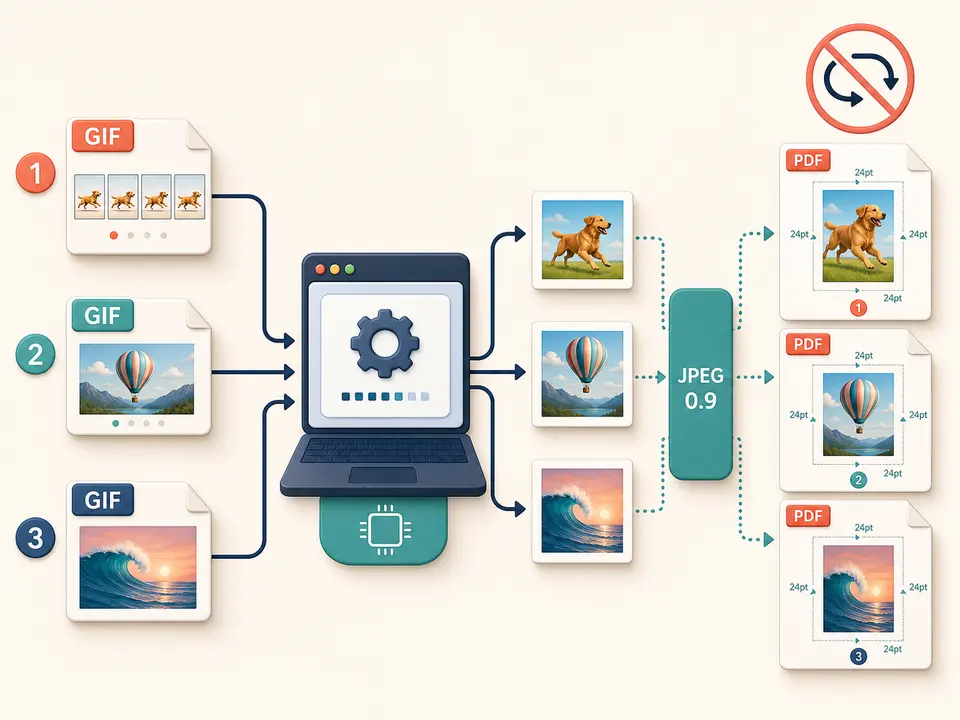
GIF to PDF accepts one to 100 files with a .gif extension. Each may be no larger than 100 MiB and must begin with a valid GIF signature. Renaming an unrelated file does not make it acceptable, while a corrupt header or browser decode failure stops the job without producing an incomplete result.
A GIF to PDF canvas is capped at 80 million decoded pixels, and the total job at 250 million. Those limits matter because a small compressed file can expand into a large in-memory bitmap. Width and height must be positive, finite and supported by the browser canvas.
An animated source is represented by the static image returned by ordinary browser decoding. Motion timing, looping, disposal methods and the full sequence are not transferred. If particular frames are required, extract and review them with an authorized animation editor first, then provide the resulting still images to the mixed-image tool.
Open every source and decide whether a static representation communicates what readers need. Export deliberate still frames elsewhere when motion is essential.
Select files in reading sequence. The tool does not sort by filename, timestamp or animation duration.
Estimate decoded pixel totals, especially for highly compressed graphics with large canvases. Resize oversized sources before starting.
The browser draws each static representation on white, encodes JPEG 0.9 and centers it inside one portrait page.
Confirm page count, order, selected still appearance, colors, small lettering and white areas. Retain the original animations because the document cannot reconstruct them.
Combine approved icons, charts or explanatory stills into a review packet. Animated transitions will not appear, so the chosen static state must stand alone.
Create a convenient viewing copy of interface graphics while preserving original files separately for motion and exact palette evidence.
Place one graphic on each consistent sheet. Add explanatory text in another authoring tool because this converter prints neither filenames nor captions.
Use the output as a visual appendix when searchable text, embedded attachments and animation are unnecessary. It is a viewing derivative, not a source archive or accessibility substitute.
GIF often stores flat colors, hard edges and tiny text efficiently. Re-encoding the decoded canvas as JPEG 0.9 can soften boundaries, add ringing around contrasting pixels or shift palette colors. Transparent regions become white because the canvas does not retain alpha. The converter offers no palette, background, compression, frame, crop or orientation controls.
Oversized artwork scales down proportionally to fit the A4 content box. A small source stays at its calculated size and may have broad white borders. Pixel dimensions do not establish a reliable physical DPI, and embedded timing or comments are not printed. Compare representative pages at normal zoom and on the intended printer.
This workflow is most predictable with deliberate still artwork. Keep the source whenever animation, exact indexed pixels or metadata has evidentiary value. The generated document favors consistent page delivery rather than bit-for-bit preservation.
Image decoding, white compositing, JPEG creation and document assembly occur in browser memory on the current device. This handler does not submit selected bytes to conversion servers, object storage, sharing or AI services, and it does not ask for remote processing consent. Normal application resources may still be downloaded.
Local processing does not make visible information harmless. A static frame can expose names, account details, private messages or internal interface states. Review every page before distribution and manage the downloaded file according to its content. TiPDF cannot erase original files, device backups or copies sent later.
When policy requires an immutable animation record, preserve the authorized original and checksums. The static derivative is useful for reading and printing, but it is not proof of the complete timeline.
Yes. This local workflow has no checkout requirement, subject to file and pixel limits.
Yes, up to 100 files are assembled in selection order.
No. Ordinary browser decoding supplies one static representation per source.
No. One selected file produces one page, not a timeline expansion.
No. The alpha-disabled canvas uses white before JPEG encoding.
No. The page contains an image and no OCR is performed.
Use Image to PDF for mixed supported formats with one local A4 page per decoded canvas.
Combine JPG or JPEG images locally into one ordered A4 PDF with one image per page.
Combine up to 100 PNG files locally into one ordered A4 PDF with white transparency flattening.
Use WebP to PDF for up to 100 white-backed A4 pages locally.
GIF to PDF capability copy was verified on July 18, 2026 against GIF-only registration, signature validation, browser image decoding, white canvas composition, 80/250-million decoded-pixel guards, JPEG 0.9 export, portrait A4 geometry and 24-point margins. Tests compare ordered source count with output pages and inspect the static image chosen by the browser. The convert GIF to PDF workflow expressly excludes animation retention, frame extraction, OCR, alpha preservation, enlargement, landscape layout and lossless embedding. A separate convert GIF to PDF check uses an animated fixture to confirm that the generated artifact contains one static page rather than a sequence.