Combining photographed evidence
Use Image to PDF to create one ordered packet from authorized photos and screenshots. Add descriptions separately because filenames and metadata are not printed.
Drop files here
Use this image to PDF workspace to combine mixed supported formats in selection order. TiPDF decodes files locally and places every image or multipage TIFF frame on its own centered A4 page.
The Image to PDF converter walks through selected files in order. Ordinary JPG, PNG, BMP, GIF, HEIC and WebP inputs each produce one decoded canvas. TIFF is different: the local UTIF decoder expands every image directory, so one multipage TIFF can contribute several consecutive pages before Image to PDF processing moves to the next selected file.
For Image to PDF assembly, each canvas is painted onto white where the browser path supports transparency, encoded as JPEG at quality 0.9 and embedded on a new portrait A4 page measuring 595.28 by 841.89 PDF points. A 24-point margin surrounds the available area. Images are reduced to fit while preserving aspect ratio, but never enlarged beyond decoded pixel size.
The result is one PDF named from the first file, with an images suffix when several inputs are selected. The image to PDF converter does not run OCR, preserve animation, create captions or place several images on one page. It is a page assembly workflow, not semantic document reconstruction.
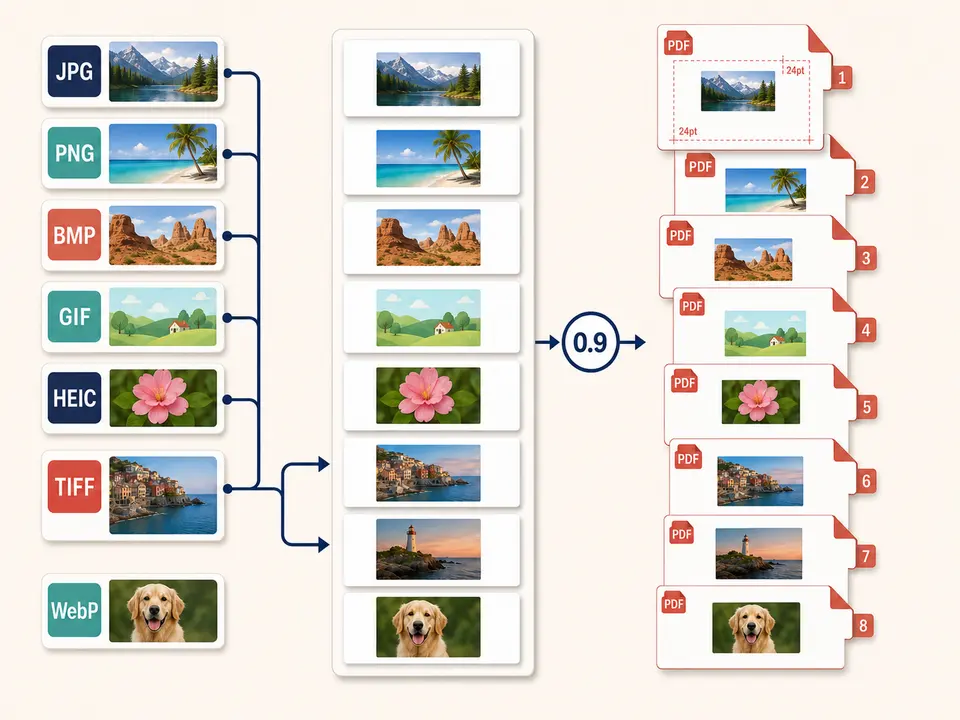
Select between one and 100 files with JPG, PNG, BMP, GIF, HEIC, TIFF or WebP extensions for Image to PDF conversion. Each local file can be up to 100 MiB, but successful processing also depends on valid content signatures and browser decoding. A renamed or damaged file is rejected.
Every Image to PDF canvas is limited to 80 million pixels, and the combined task is limited to 250 million pixels. These limits apply after decoding, so a highly compressed source can still be too large. HEIC uses a lazy-loaded local decoder and first becomes JPEG at quality 0.92. TIFF pages use UTIF and can increase the output page count beyond the number of files.
Image to PDF does not retain GIF animation as moving content; the browser-decoded static image becomes one page. Alpha-capable ordinary formats are composited onto white. All final page images are JPEG 0.9, so even a lossless or transparent source changes representation.
Arrange files in the sequence readers should see. Rename them clearly before selection because the tool does not sort by visual content.
Count TIFF frames, choose the intended static GIF representation and expect transparent areas to become white.
Image to PDF validates extensions, signatures, file size and decoded pixel limits locally. Remove oversized or damaged sources instead of repeated retries.
The browser decodes each source, creates one A4 page per canvas, fits it within 24-point margins and saves one PDF.
Compare order, frame count, orientation, white backgrounds, fine detail and margins. Keep the originals because JPEG embedding is a derivative.
Use Image to PDF to create one ordered packet from authorized photos and screenshots. Add descriptions separately because filenames and metadata are not printed.
Mix supported bitmap formats into a consistent A4 reading copy, then use OCR separately only if searchable text is needed.
Use a photo to PDF workflow for review sheets while understanding that color profiles, transparency and lossless detail may change.
Place all TIFF directories beside ordinary image files in one sequence. Verify page count carefully because one file can create many pages.
Aspect ratio is preserved, and images larger than the available A4 area are scaled down. Smaller images are not enlarged, so they can occupy a modest centered area with generous white space. There is no landscape-page choice, edge-to-edge mode, custom margin, cropping or rotation control.
Every page uses JPEG quality 0.9. Photographs usually fit that representation, but line art and small text can show artifacts. Transparency becomes white on ordinary browser-decoded formats, and animation disappears. The converter does not preserve EXIF, layers or interactive content as PDF features. Inspect a zoomed output when visual fidelity matters.
Decoding, white compositing, JPEG encoding and PDF assembly happen in browser memory on the current device. The handler does not send selected images to conversion, storage, sharing or AI endpoints and does not request remote approval. Decoder code and normal site assets may still be fetched.
Downloaded output and source images remain on the device. TiPDF cannot delete local files, camera metadata in originals, backups or later shares. The generated PDF does not intentionally include source filenames, but users should still inspect visible content before distribution.
Yes. The workspace accepts all seven supported image families together in selection order.
Yes. The local workflow has no account or checkout requirement, subject to the file, pixel and browser-memory limits.
It creates one A4 page per decoded canvas, but it does not print captions or filenames.
Usually, but a multipage TIFF contributes one page per decoded directory.
No. The PDF contains a static browser-decoded image page.
No. Ordinary alpha-capable inputs are composited on white before JPEG embedding.
No. Images remain image content; use OCR as a separate reviewed workflow.
Combine JPG or JPEG images locally into one ordered A4 PDF with one image per page.
Combine up to 100 PNG files locally into one ordered A4 PDF with white transparency flattening.
Decode every directory in selected TIFF files locally and place each frame on its own ordered A4 PDF page.
Apply a fixed document-style treatment to existing images and assemble them as one image-based PDF.
Image to PDF capability copy was verified on July 18, 2026 against mixed-format registration, local decoders, TIFF directory expansion, HEIC conversion, 80/250-million pixel limits, A4 geometry, 24-point margins and JPEG 0.9 embedding. Verification combines several extensions in one ordered job, compares decoded canvas count with output page count and confirms that each page contains one centered image. The image to PDF artifact is also checked for a valid signature and stable portrait page dimensions. It excludes animation, OCR, transparency, enlargement, landscape pages and multi-image layouts.