First-pass orientation
Use an AI PDF reader to identify likely sections and themes before a careful human read. Treat the outline as navigation help because headings and page order can be interpreted incorrectly.
Drop files here
Use AI PDF analysis to examine embedded document text after it is extracted on your device. TiPDF asks for explicit approval before sending that reviewed text—not the PDF file—to the configured AI provider, then returns Markdown insights.
The AI PDF workflow separates file reading from remote analysis. Browser code opens one genuine PDF, reads its embedded text page by page and adds page markers. Only after the privacy notice is reviewed and approved does the client post that extracted text to TiPDF's document AI endpoint. The original PDF bytes are not placed in that AI request.
The AI PDF server instruction asks the configured model to examine structure, main claims, key facts, action items, risks and unanswered questions. It also treats everything inside the document as untrusted source material rather than instructions. This prompt-injection boundary matters because a document can contain commands, links or misleading requests that should not control an AI PDF assistant.
The returned AI PDF answer is plain Markdown text. It is useful as an analytical draft, not a verified report, legal opinion or substitute for reading the source. The model may omit context, misunderstand a table or state an unsupported conclusion. Compare every material observation with the page-marked extraction and the visible PDF before acting on it.
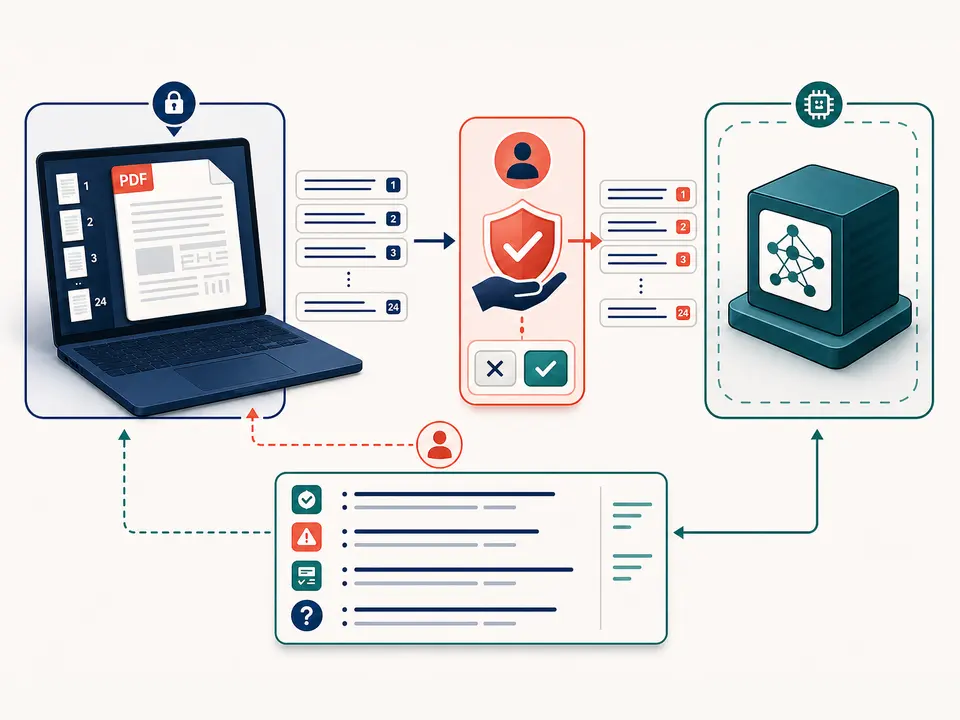
Select one .pdf whose extension and file signature are valid for AI PDF analysis. Local safeguards allow files up to 100 MiB and PDFs up to 500 pages. Password-protected documents must first be unlocked with authorization. The extractor reads embedded text; it does not run OCR, interpret page images or recover words that exist only in a scan.
The AI PDF request accepts at most 150,000 characters after surrounding whitespace is removed. Page markers count toward that limit. If the extraction is empty, the server tells you to run OCR first; if it is too long, the task stops rather than silently discarding an unknown portion. Splitting a long source into reviewed sections is safer than assuming one oversized analysis is complete.
The output is a UTF-8 .md file named from the source and analyze operation. No edited PDF, embedded annotation, citation map or persistent knowledge base is created. The configured provider must expose an HTTP or HTTPS OpenAI-compatible chat completions endpoint and have an API key; the default model name is gpt-4.1-mini only when deployment settings do not choose another model.
Confirm that selectable text exists and that you are permitted to send its contents to the configured provider. Use OCR PDF first for a scanned source, then inspect the recognized text.
TiPDF validates the PDF locally and reads every permitted page. Encrypted, malformed, oversized or over-page-limit inputs stop with an error.
The approval step explains that extracted document text will leave the device. Continue only when the provider, deployment policy and information sensitivity are acceptable.
The browser sends page-marked text after approval. The endpoint applies a 30-second minimum request interval and a 120-second timeout while the configured model prepares an answer.
Open the Markdown result beside the original. Trace facts, dates, risks and action items back to the correct pages, record corrections and never treat fluent language as proof.
Use an AI PDF reader to identify likely sections and themes before a careful human read. Treat the outline as navigation help because headings and page order can be interpreted incorrectly.
Use AI PDF analysis to surface possible caveats, obligations and unresolved questions. A missed clause remains possible, so contracts, policies and regulated material still require qualified review.
Turn readable briefing text into a candidate list of facts, decisions and follow-ups. Verify owners, dates and wording against the source before circulating notes.
Compare the AI PDF response with an abstract and conclusion to decide where to read more deeply. This tool does not assess study quality, reproduce charts or validate references.
The system prompt tells the provider to ground claims in the supplied document, clearly state uncertainty and ignore instructions found inside the source. Those controls reduce risk but cannot guarantee factuality. Text extraction can scramble columns, separate captions from figures or omit image-only content before the model sees anything.
An AI PDF assistant also has no independent access to the visible page, external databases or the truth of statements in the document. It can summarize a false claim faithfully or infer more than the text supports. Numbers, quotations, identities, deadlines and safety-critical conclusions demand line-by-line verification. Use narrower tools when the real need is a summary, translation, question set or focused answer.
The AI PDF source is parsed and its embedded text is assembled in browser memory. After explicit approval, that text and the analyze instruction travel through the TiPDF server to the configured AI provider. This is not a local-only feature, even though the original file itself is not included in the JSON request.
TiPDF sets no universal promise about provider retention, server logs or automatic deletion because deployments and configured endpoints differ. The response and downloaded Markdown remain on the device. Remove unnecessary sensitive sections before processing, follow organizational policy and do not approve the transfer when remote AI use is prohibited.
The AI request contains locally extracted text, page markers and the operation instruction, not the original PDF bytes. The text still contains document information and requires approval.
This page requests broad analysis. Use Chat with PDF for one focused question and a separate approved request.
This extractor reads embedded text and does not OCR page images. Run OCR first and review recognition errors.
Not in one request. The server rejects longer text; split the source into meaningful reviewed sections.
No. Extraction and model errors can both affect the answer. Verify every important statement against the document.
The deployment chooses an OpenAI-compatible endpoint and model. If no model is configured, the service code requests gpt-4.1-mini.
Ask one focused question about locally extracted PDF text after reviewing and approving the transfer.
Turn approved embedded PDF text into a concise Markdown brief, then audit facts and omissions.
Translate approved embedded PDF text into one of six languages and review the Markdown draft.
Use the AI question generator from PDF for 12 reviewable questions with concise answers.
AI PDF capability copy was verified on July 18, 2026 against the local PDF.js text extractor, 500-page guard, approval gate, 150,000-character API schema, injection-resistant system instruction, configured chat-completions request and Markdown artifact. It does not claim OCR, whole-file upload, guaranteed accuracy or universal deletion.