Distributing policy manuals
Use ODT to PDF for stable pages while retaining the styled source as the maintained master.
Drop files here
Use ODT to PDF when an OpenDocument Text source needs a fixed review or distribution copy. TiPDF obtains approval, sends one file to the configured private renderer and validates the returned PDF.
The ODT to PDF converter receives one OpenDocument package and marks the operation as server processing. After explicit consent, ODT to PDF sends the complete file through TiPDF to the configured Gotenberg LibreOffice endpoint. No browser code attempts to reproduce the document model.
ODT to PDF relies on LibreOffice to resolve styles, master pages, text flow, tables, images, footnotes and supported objects using that installation's fonts and locale. Results can differ from the source editor, especially when dependencies are absent.
The server accepts only a successful response whose first bytes identify a PDF. It rejects configuration problems, HTTP errors, timeouts and non-PDF output. The validated bytes return with a sanitized base filename; TiPDF does not edit the rendered pages afterward.
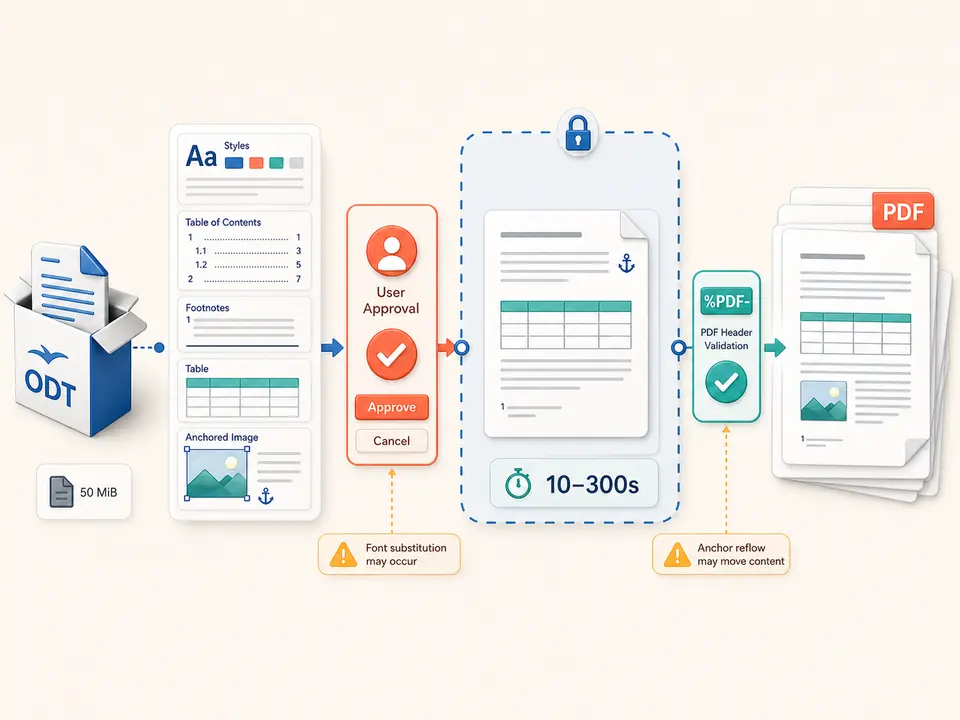
ODT to PDF accepts one .odt no larger than the 50 MiB server limit. The source must be a readable OpenDocument Text package. Damaged ZIP structure, missing manifest entries, encrypted content or unsupported features can cause rejection. This page does not accept DOCX, RTF, pasted text or a URL.
ODT to PDF needs a valid HTTP(S) Gotenberg URL. Requests use its LibreOffice route with a trace header and a timeout between 10 and 300 seconds, normally 120. A missing endpoint prevents upload.
Fonts and language tools are those installed beside the renderer. Linked resources must be available inside the document package or service environment. External application links are not fetched as a general browsing feature, and macros are not promised in the static result.
Refresh contents, fields, cross-references, footnotes and page counts in the authoring application.
Confirm page styles, fonts, images, anchored objects and language settings on a representative computer.
Remove hidden text, comments, tracked changes and unused embedded files from the approved copy.
Approve complete-file server processing and wait for the bounded private-renderer request.
Check headings, contents entries, footnotes, tables, image anchors, blank pages and final pagination before release.
Use ODT to PDF for stable pages while retaining the styled source as the maintained master.
Review citations, notes, formulas and generated contents after rendering because page movement can break references.
Provide recipients with a common reading copy without requiring their office suite to reproduce every style.
Store the PDF with source, fonts policy and version information when provenance matters. The conversion does not claim PDF/A, accessibility conformance, a digital signature or preservation of the package's full metadata.
ODT separates content from named styles and supports complex page masters. A substituted font changes wrapping and can shift headings, footnotes, tables and cross-reference targets. Anchored frames may move when their surrounding paragraph reflows. Formula, chart, drawing and change-tracking support depends on the installed LibreOffice build.
The source controls page size, orientation and margins as interpreted by the renderer; this web page supplies no replacement layout options. Images may be resampled by office export, color profiles can render differently and interactive form behavior is not guaranteed.
The output is dependable only after document-specific comparison. Inspect every style family and a sample of long pages, then verify the complete result when it becomes a formal record. Keep the editable package for corrections, future revisions and comparison with later renderer upgrades.
This route is not device-only. Once approved, the full ODT is handled by TiPDF's server and the configured Gotenberg service. Administrators are responsible for network transport, endpoint access, logs, temporary files and retention. The public product copy cannot promise a particular deployment's deletion schedule.
OpenDocument packages may contain more than visible pages: thumbnails, metadata, comments, tracked revisions, embedded objects and images can remain inside. Clean an authorized copy before upload and inspect the returned document properties. Rendering does not perform redaction.
A downloaded PDF can be copied or indexed. Apply access policy after conversion and use separate password protection only when appropriate; encryption of the output cannot undo disclosure to the authorized renderer.
The page has no checkout, but deployment access and the configured renderer determine availability.
No. User approval is required before server and configured-renderer processing.
Not guaranteed; font metrics, fields and renderer versions can change wrapping.
Do not assume so; resolve or remove them and review the static output.
One valid ODT up to 50 MiB.
Yes. TiPDF requires a successful service response with a PDF signature.
Send one approved Word file to the configured office renderer and verify the returned PDF.
Use RTF to PDF for one approved 50 MiB private-renderer request.
Use ODS to PDF for one approved 50 MiB private-renderer request.
Use ODP to PDF for one approved 50 MiB private-renderer request.
ODT to PDF capability copy was verified on July 18, 2026 against ODT registration, the 50 MiB server guard, explicit approval, HTTP(S) Gotenberg configuration, LibreOffice routing, trace identifiers, bounded 10–300-second timeouts and returned PDF signature validation. Test packages include styles, a generated contents list, tables, footnotes, images and non-Latin text, plus damaged-package and missing-service failures. The convert ODT to PDF route excludes local-only processing, exact font equivalence, stable pagination, macro execution, PDF/A and automatic redaction. A second convert ODT to PDF inspection checks anchors and cross-reference page numbers. Comparison includes both screen viewing and a representative printed sample.