Freezing portable memos
Use RTF to PDF for fixed review pages while retaining the editable source under version control.
Drop files here
Use RTF to PDF when a rich-text document needs fixed pages. After explicit approval, TiPDF sends one validated RTF to the configured document renderer and returns the PDF response.
The RTF to PDF converter accepts one file and displays a server-processing boundary before work begins. Only after approval does RTF to PDF upload the source through TiPDF to the configured Gotenberg LibreOffice endpoint. This is not a local-only operation.
RTF to PDF uses the service to interpret controls, fonts, paragraphs, tables, images and page instructions. TiPDF does not rebuild that layout in the browser and does not promise identical output to every desktop editor. The renderer's PDF bytes are returned through the application.
Before delivery, the response must begin with a valid PDF signature and contain enough bytes to be plausible. A service error, timeout or invalid response produces an error rather than a mislabeled download. The filename is normalized from the source base name.
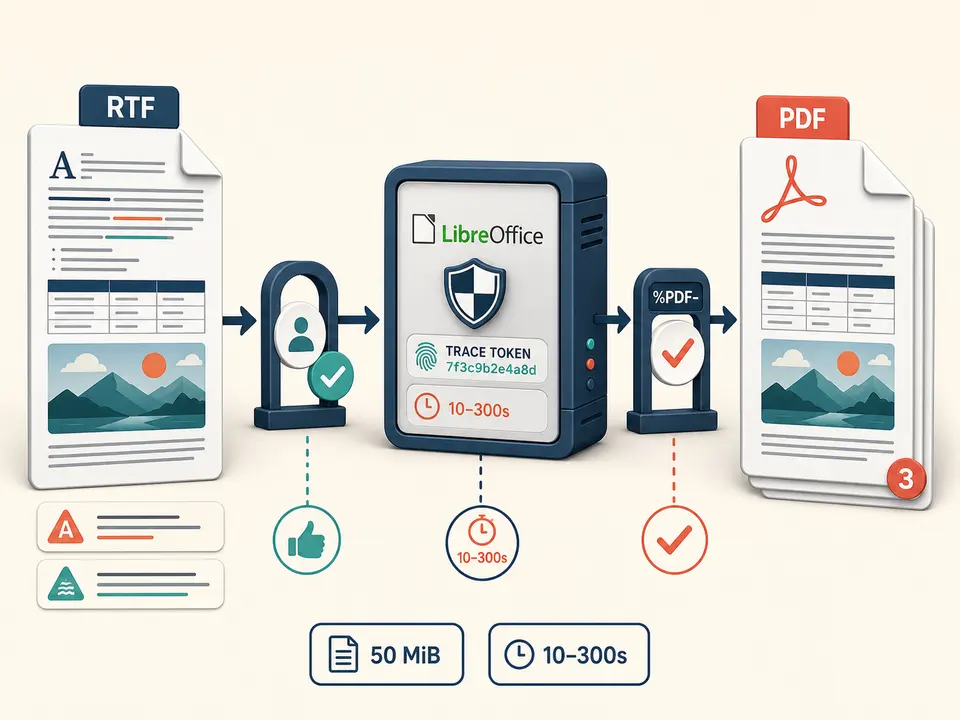
RTF to PDF accepts one .rtf file no larger than 50 MiB. Extension and upload rules apply before server processing. Password-protected, malformed or unusually encoded RTF may be rejected by the configured renderer. The current route does not accept a pasted rich-text fragment or URL.
RTF to PDF needs a valid HTTP or HTTPS Gotenberg URL. Without it, conversion stops with a configuration error. Requests use the LibreOffice route, carry a trace identifier and have a timeout between 10 and 300 seconds, normally 120.
Available fonts, locale data and office filters belong to that service installation. A document relying on absent fonts or nonstandard controls can reflow or lose effects. Embedded active behavior is not promised, and the PDF should be treated as a static rendering.
Open it in a trusted editor and remove tracked secrets, hidden fields and unwanted comments.
Use common fonts, inspect linked or embedded images and avoid editor-specific features when portability matters.
Confirm that policy permits the complete file to reach TiPDF and the configured private renderer.
Submit one source, wait for the bounded service response and do not repeatedly upload while a request is active.
Inspect page count, line breaks, tables, symbols, images, headers and footers against the approved source before distribution.
Use RTF to PDF for fixed review pages while retaining the editable source under version control.
Create a conventional reading copy from older rich-text exports whose recipients may not have a compatible editor.
Check that fonts, pagination and signatures appear correctly before sending a static document to a portal.
Store the PDF beside, not instead of, the source when exact RTF controls or embedded metadata matter. The route does not declare PDF/A conformance, digital signatures or long-term archival guarantees.
RTF is a control-word format implemented differently by word processors. Font substitution changes character width and can move paragraphs, tables and later pages. Unsupported fields, drawing objects, equations or nested constructs may simplify. The service chooses paper size and pagination from the document and renderer defaults; the page offers no orientation, margin or quality controls.
Linked resources unavailable to the private service may not render. Embedded images can change color or resolution through the office export filter. Macros or interactive behavior are not carried into a normal static PDF.
The service should be validated with representative documents from the real workflow. Compare text selection, glyphs, page breaks and visual hierarchy, and keep the editable original whenever subsequent correction may be needed.
Unlike local TXT or Markdown layout, this workflow uploads the complete approved document. The application server forwards it to the administrator-configured Gotenberg endpoint. Security, retention, network path and logging therefore depend on the deployment and that service; TiPDF does not claim the bytes stay solely on the user's device.
Review personal data, hidden text, revision remnants, embedded objects and document properties before approval. The returned PDF can still contain selectable confidential text and visible metadata. Server rendering is not redaction or encryption.
After download, local and shared copies remain outside TiPDF's control. Use the Protect PDF tool separately if password encryption is required, while recognizing that access restrictions do not erase content already disclosed to the renderer.
The page has no checkout, but deployment access and the configured renderer determine availability.
No. It requires approval and uploads to the configured private server renderer.
No. Fonts, locale and renderer versions can change layout.
One approved RTF may be up to 50 MiB.
No. It verifies that returned bytes begin with a PDF signature.
No guarantee is made; review the static result carefully.
Send one approved Word file to the configured office renderer and verify the returned PDF.
Use ODT to PDF for one approved 50 MiB private-renderer request.
Use TXT to PDF for one searchable local A4 document with fixed typography.
Route one supported file through the appropriate local or approved remote conversion path.
RTF to PDF capability copy was verified on July 18, 2026 against RTF registration, the 50 MiB server-file guard, explicit approval, configured HTTP(S) Gotenberg validation, the LibreOffice conversion route, 10–300-second timeout bounds, trace headers and returned PDF signature checks. Fixtures cover configuration absence, service rejection, timeout and a successful multi-page rendering. The convert RTF to PDF route excludes local-only claims, universal font fidelity, fixed pagination, PDF/A, redaction and encryption. A second convert RTF to PDF review compares tables and non-ASCII glyphs against the source.