Reading assistance
Use Translate PDF for a draft in a familiar language, then return to source passages for exact meaning.
Drop files here
Translate PDF text by extracting readable content on your device, approving its transfer and sending it to the configured AI provider. The result is translated Markdown rather than a layout-preserved PDF.
The Translate PDF workflow reads embedded text locally with PDF.js and adds markers for each page. After explicit approval, TiPDF sends those text characters and the selected target language through its server to a configured OpenAI-compatible model. Original PDF bytes, page images and fonts are not part of the AI request.
Translate PDF instructs the provider to translate the document while preserving headings, lists, numbers, names and page markers in text form. It is also told to treat document content as untrusted material and ignore instructions hidden inside it. A PDF translator can follow that structure imperfectly; tables, columns and captions may already be flattened before translation begins.
The Translate PDF response is saved as Markdown. It does not reproduce coordinates, illustrations, signatures, forms or typography, and it does not create a bilingual or replacement PDF. Claims such as preserve PDF layout or translate a scanned PDF directly would be inaccurate for this handler. Use the output as a translation draft and compare it with the source.
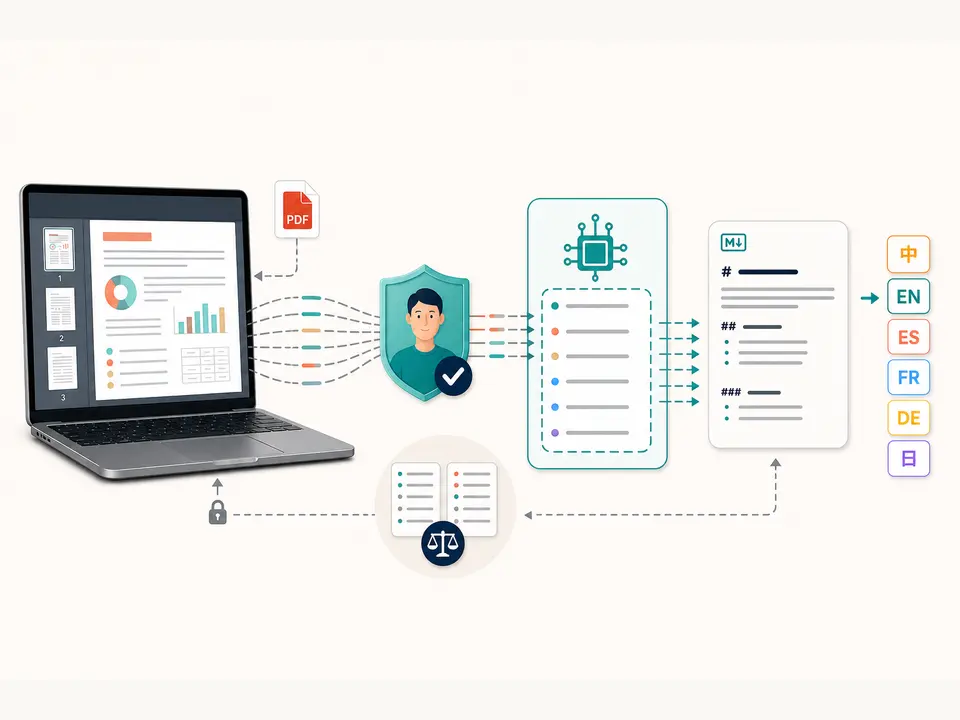
Select one authentic PDF no larger than 100 MiB and 500 pages for Translate PDF. Extension, signature and parsing are checked locally. Password-protected material needs authorized unlocking. Only embedded text is extracted; image-only pages require OCR PDF first, and recognition errors will otherwise be carried into the translation.
The Translate PDF target choices are Chinese, English, Spanish, French, German and Japanese. The API accepts a target-language value up to 80 characters, but the interface exposes only those six options. It does not offer a source-language selector, glossary, tone control, bilingual alignment or certified translation workflow.
Text sent to the endpoint is limited to 150,000 characters including page markers. Empty or over-limit content is rejected. The configured provider request times out after 120 seconds and is limited to a 30-second minimum interval per request key. Translate PDF output is one UTF-8 .md file with a translate suffix, not an edited PDF.
Check several pages and scripts. Run OCR first for scans, then correct critical names and numerals before using the PDF translator.
Select Chinese, English, Spanish, French, German or Japanese. Make sure the destination language fits the actual audience.
Extracted text will leave the device and reach the configured provider. Approve only when rights, policy and confidentiality permit it.
TiPDF submits the page-marked text with preservation instructions for headings, lists, numbers and names, then creates Markdown from the response.
Compare headings, negatives, measurements, dates, defined terms and proper nouns line by line. Use a qualified translator where accuracy has legal, medical, financial or safety consequences.
Use Translate PDF for a draft in a familiar language, then return to source passages for exact meaning.
Use a PDF translator to identify which sections deserve professional translation. Do not circulate unreviewed output as an official version.
Translate PDF abstracts and headings to locate relevant material while preserving original citations and names separately.
Draft text for later editorial layout. Rebuild the final document in an appropriate authoring tool because this service does not preserve PDF layout.
Translation quality depends on extraction order, source clarity, language pair, specialist vocabulary and model behavior. A flattened table can lose row relationships; a missing image label can change a paragraph; ambiguous pronouns and abbreviations may be resolved incorrectly. The instruction to preserve names and numbers reduces risk but does not guarantee it.
When you translate PDF text, review terminology consistency, units, decimal separators, negation and legally defined phrases. Page markers may help navigation but are not enforced citations. The model does not consult an approved terminology database unless the configured provider independently supplies one, and the current interface has no glossary field.
PDF reading occurs in browser memory. After approval, extracted page-marked text and the target language are sent through TiPDF's server to the configured AI endpoint. Although the original file is not included, the text may disclose nearly all meaningful content of a text-heavy document.
Provider retention, access logs and deletion depend on the deployment, so no universal deletion promise is made. The translated response and downloaded Markdown remain on the device. Do not use remote translation for restricted material unless the configured service and organizational policy explicitly allow it.
Yes. English is one of six target choices, but the result is a reviewable Markdown draft rather than a certified replacement PDF.
The page has no checkout or account requirement, while the configured provider and deployment determine service availability.
No. The output is translated Markdown text, not a rebuilt PDF with original coordinates and design.
Not directly. Run OCR first and correct recognition errors before translation.
Chinese, English, Spanish, French, German and Japanese in the current interface.
No. The model response has no translator certification or guaranteed accuracy.
The AI request contains extracted text, page markers and the target language after approval, not original PDF bytes.
Recognize English or Simplified Chinese locally and download searchable PDF plus plain text.
Ask one focused question about locally extracted PDF text after reviewing and approving the transfer.
Turn approved embedded PDF text into a concise Markdown brief, then audit facts and omissions.
Analyze locally extracted and explicitly approved PDF text for claims, risks, actions and open questions.
Translate PDF copy was verified on July 18, 2026 against local embedded-text extraction, six target-language options, approval, 150,000-character schema, preservation instruction, configured provider request and Markdown artifact. Review covered empty text, oversized context, timeout and unconfigured-provider failures as visible errors. These boundaries remain relevant regardless of the chosen target language or source document length. OCR, certified accuracy, glossary control, bilingual alignment and layout-preserved PDF output are excluded.