Self-study
Use the AI question generator from PDF for a first practice set after reading a chapter, then verify the answer key against the source.
Drop files here
The AI question generator from PDF text reads embedded content locally, asks you to approve sending that text, then requests 12 study questions with concise answers that progress from recall to analysis.
The AI question generator from PDF starts by validating one document and extracting its embedded text page by page in the browser. Once the transfer disclosure is approved, TiPDF sends that page-marked text—not the original PDF bytes—to the configured OpenAI-compatible provider.
The AI question generator from PDF uses a fixed instruction for 12 useful study questions with concise answers, progressing from recall to analysis. It does not specifically require multiple choice, scoring, distractors, difficulty labels or a separate answer key. A question paper generator from PDF content may therefore return a mixed Markdown list rather than an exam-ready paper.
The AI question generator from PDF system message tells the model to ground claims in the document, state uncertainty and ignore commands inside the source. These safeguards help, but a generated answer may still be incomplete or wrong. The set is a draft for review: compare every answer with the source, remove ambiguous items and revise language for the intended learners.
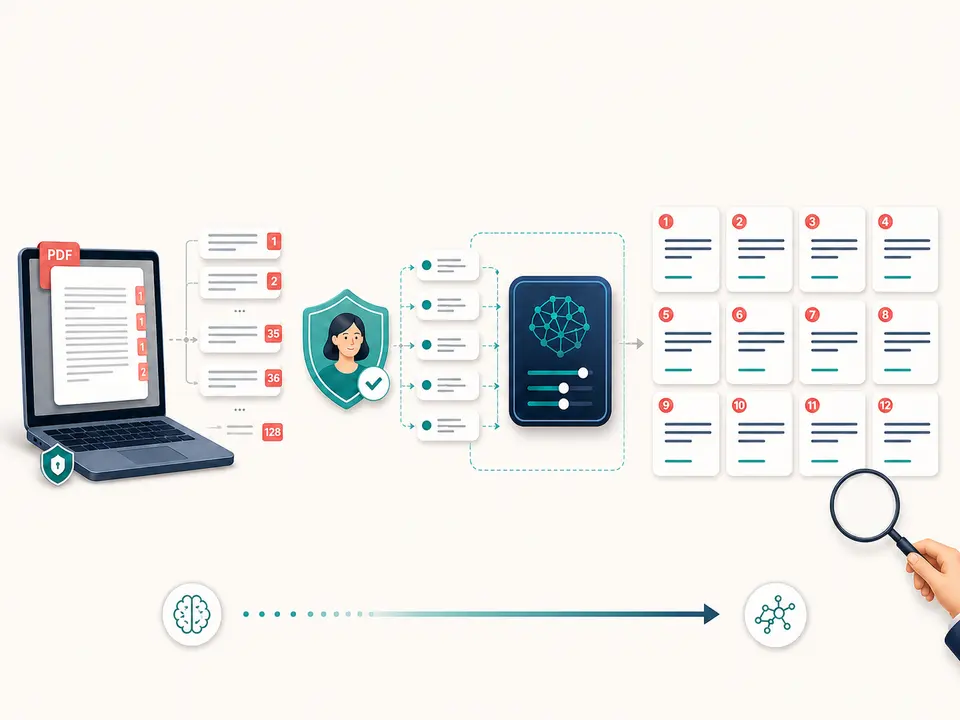
Choose one valid .pdf up to 100 MiB and 500 pages for the AI question generator from PDF. Local checks verify its signature and readability; encrypted content must be unlocked only with authorization. Extraction reads selectable embedded text and page markers. Scanned pages, diagrams and handwritten notes need OCR first, with recognition errors corrected before question creation.
The AI question generator from PDF context is limited to 150,000 characters. Empty text produces a Run OCR first error, while longer context is rejected rather than silently clipped. Split an oversized source by coherent units and generate separate reviewed sets; otherwise learners may receive questions without necessary preceding material.
The AI question generator from PDF result is one UTF-8 Markdown file with a questions suffix. It contains the configured provider's response and does not modify the PDF. The endpoint has a 120-second timeout and a 30-second minimum interval per request key. No export to a learning platform, randomization, persistent question bank, grading engine or learner tracking is implemented.
Select material that forms one coherent unit and decide which learners will use it. The fixed prompt cannot see a syllabus or assessment standard.
Confirm text is selectable and ordered. Run OCR for scans, then correct technical terms, equations, names and numbers before continuing.
Read the notice that extracted text will reach the configured provider. Continue only when rights, sensitivity and institutional policy permit the transfer.
TiPDF submits the complete permitted context with the recall-to-analysis instruction and downloads 12 questions and concise answers as Markdown.
Locate support for every answer, check that each question has one defensible interpretation, balance coverage and remove items that expose sensitive or irrelevant details.
Use the AI question generator from PDF for a first practice set after reading a chapter, then verify the answer key against the source.
Use the AI question generator from PDF for candidate prompts, then align wording, rigor and accessibility with course outcomes. Human authors remain responsible for the final assessment.
Turn approved policy text into discussion questions and concise candidate answers. Confirm that exceptions and current versions are represented.
Generate recall and analytical prompts for a paper, then add human questions about methodology, evidence quality and limitations that the model may overlook.
An AI question generator from PDF can produce a fluent question that is still invalid. Extraction can flatten tables or reorder columns, and the model can create an answer from nearby but unrelated statements. The fixed progression from recall to analysis does not guarantee a calibrated difficulty curve, curriculum alignment or equal coverage of all sections.
Review each pair for factual support, clarity, bias, duplicated concepts and unintended clues. Verify numbers, negatives and definitions word for word. The current instruction requests concise answers, so nuanced subjects may be oversimplified. For graded, regulated or high-stakes assessment, use qualified subject-matter and assessment review.
AI question generator from PDF parsing and text extraction occur in browser memory. After approval, page-marked text and the fixed question instruction pass through TiPDF's server to the configured AI provider. Original file bytes are not in the JSON request, but extracted text can still reveal confidential educational or business material.
Provider logging, access and retention vary by deployment, so TiPDF makes no universal deletion promise. The Markdown set remains in the interface and any download remains on the device. Remove unnecessary personal data and do not submit restricted source material unless remote AI processing is explicitly allowed.
The current instruction requests 12 questions with concise answers, moving from recall toward analysis.
It creates one reviewed Markdown draft from embedded text; it does not alter the source or maintain a question bank.
It produces 12 review questions and concise answers, but it does not randomize, grade or store a quiz.
Yes, as one Markdown draft that requires source verification and educator review.
Not specifically. The prompt does not require options or distractors, so an MCQ generator from PDF is not guaranteed here.
Not directly. Use OCR first and correct recognition errors before generating questions.
No. Every answer must be traced to the source and reviewed by someone who understands the subject.
No. One run returns one Markdown artifact; persistent storage, grading and learner analytics are not implemented.
Turn approved embedded PDF text into a concise Markdown brief, then audit facts and omissions.
Ask one focused question about locally extracted PDF text after reviewing and approving the transfer.
Analyze locally extracted and explicitly approved PDF text for claims, risks, actions and open questions.
Recognize English or Simplified Chinese locally and download searchable PDF plus plain text.
Question-generation copy was verified on July 18, 2026 against local page-marked extraction, explicit approval, 150,000-character context limit, the fixed 12-question instruction, injection-resistant system prompt, configured provider request and Markdown result. These boundaries matter for every generated set. Multiple-choice format, exam calibration, persistent banks, grading and guaranteed answers are excluded.