Locating an obligation
Chat with PDF text to ask which party performs a named action and by what date. Use the response as a lead, then read the complete clause, definitions and exceptions.
Drop files here
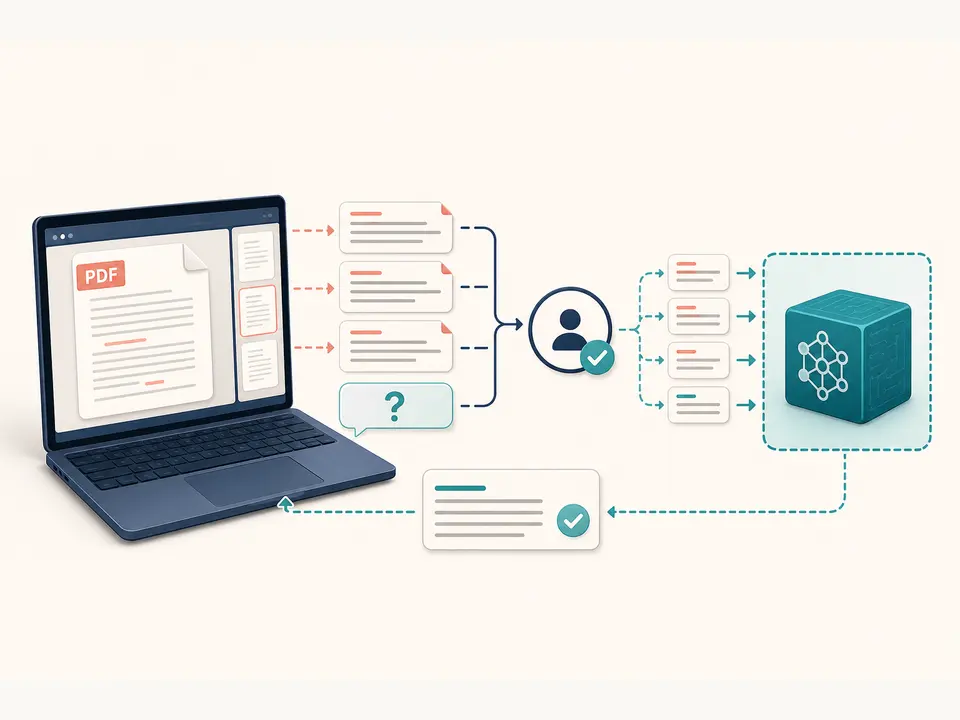
Chat with PDF content when you need a focused answer from embedded document text. TiPDF extracts that text locally, requires approval, then sends the page-marked text and your question to the configured AI provider.
Chat with PDF here means one question submitted with one extracted document context. The browser validates a PDF, reads embedded text from each page and adds page markers. After you approve remote processing, TiPDF sends that text plus the question to a configured OpenAI-compatible chat completions endpoint. The Chat with PDF request does not upload the original PDF.
The Chat with PDF service instruction says to answer using only the document and to say when the answer is absent. A separate system instruction treats document text as untrusted, rejects commands found inside it and asks for grounded claims with visible uncertainty. These safeguards are designed for focused retrieval, but they do not turn the model into a deterministic search engine.
This Chat with PDF page is not a persistent multi-turn chat room. Each run creates one request and one Markdown response; the current handler does not preserve conversational history, build a vector index or remember a prior answer. To ask another question, run another approved request with the document context again. Phrase each question so the needed subject, period and comparison are explicit.
Choose one genuine PDF up to 100 MiB and 500 pages for Chat with PDF. A valid file signature is required, and protected content must be unlocked with permission. The local extractor reads selectable embedded text only. Image-only scans, diagrams and text baked into screenshots are invisible unless you first create and review an OCR-derived file.
The Chat with PDF question field can contain up to 2,000 characters at the API boundary. If it is empty, the service falls back to asking what the document is about, but a specific prompt normally produces a more testable answer. The extracted document context is capped at 150,000 characters; the server rejects empty or longer text.
The answer is returned as UTF-8 Markdown and downloaded with a chat suffix. It is not inserted into the source PDF and does not include guaranteed page citations. Page markers are present in the context, but the prompt does not require a citation for every claim, so verify locations manually rather than assuming a displayed number is reliable.
Try selecting a sentence in the PDF. If the page is a scan, use OCR PDF and correct recognition problems before starting document chat.
Name the clause, date range, person or comparison you need. Avoid asking for several unrelated outputs because omissions become harder to detect.
Understand that extracted text and your question will be sent through the server to the configured provider. Approve only when that transfer is allowed.
TiPDF reads the permitted pages locally and submits the question with page-marked text. Requests are rate-limited to one per 30-second interval for the request key and time out after 120 seconds.
Find the supporting wording in the visible PDF. If the answer says information is absent, search the source yourself because extraction or reasoning may have missed it.
Chat with PDF text to ask which party performs a named action and by what date. Use the response as a lead, then read the complete clause, definitions and exceptions.
Use Chat with PDF to ask whether the text states a particular metric or limitation. The AI document chat cannot read an unlabeled chart image, and it does not independently validate the number.
Request the document's stated position on one topic before a meeting. Preserve qualifications instead of copying a short answer without context.
Ask a targeted conceptual question about lecture or training material. The answer may help comprehension, but instructors and source material remain authoritative.
Chat with PDF accuracy is limited first by extraction. Multi-column text may arrive out of reading order, tables may lose relationships and image-only passages may be absent. It is limited again by model behavior: the provider can overlook evidence, combine nearby facts or answer more confidently than the source warrants.
When you chat with PDF content, the instruction to use only the document and admit absence is a control, not a warranty. Ask narrow questions, include the exact entity, distinguish stated facts from interpretation and compare the response with surrounding paragraphs. For legal, health, financial, employment or safety decisions, use qualified human review and the authoritative source.
PDF parsing happens in browser memory. Once approved, the extracted page-marked text and your question are sent through TiPDF's AI API to the deployment's configured provider. Original PDF bytes are not in that JSON payload, but the text can reveal most of a text-heavy document and must still be treated as sensitive.
Provider policies, access logs and retention depend on the deployment, so TiPDF does not promise universal deletion. The Markdown answer remains in the interface and any downloaded file remains on the device. Avoid submitting secrets or regulated material unless the configured environment and policy permit it.
No. Each run sends one question with the extracted document text and returns one answer. No prior-turn history is retained by this handler.
Not reliably. Embedded-text extraction does not see pixels. OCR can recognize visible words but may still lose chart relationships.
Yes, but each question is a new approved request with the full extracted context and rate limit. No conversation memory is retained.
The page has no checkout or account requirement, but the configured provider and deployment determine service availability.
The model is instructed to say so, yet you should still search and inspect the source because it can miss evidence.
Yes. After approval, both the question and extracted text are included in the remote request.
Not guaranteed. Page markers are included in context, but the implementation does not enforce citation output.
Analyze locally extracted and explicitly approved PDF text for claims, risks, actions and open questions.
Turn approved embedded PDF text into a concise Markdown brief, then audit facts and omissions.
Translate approved embedded PDF text into one of six languages and review the Markdown draft.
Recognize English or Simplified Chinese locally and download searchable PDF plus plain text.
Chat with PDF copy was verified on July 18, 2026 against local text extraction, the approval gate, 2,000-character question schema, 150,000-character context cap, document-only instruction, configured provider call and one Markdown artifact. Persistent chat, OCR, enforced citations and guaranteed correctness are excluded.