Executive orientation
Use a PDF summarizer to preview a long report's stated decisions, dates and reservations before reading relevant sections in full.
Drop files here
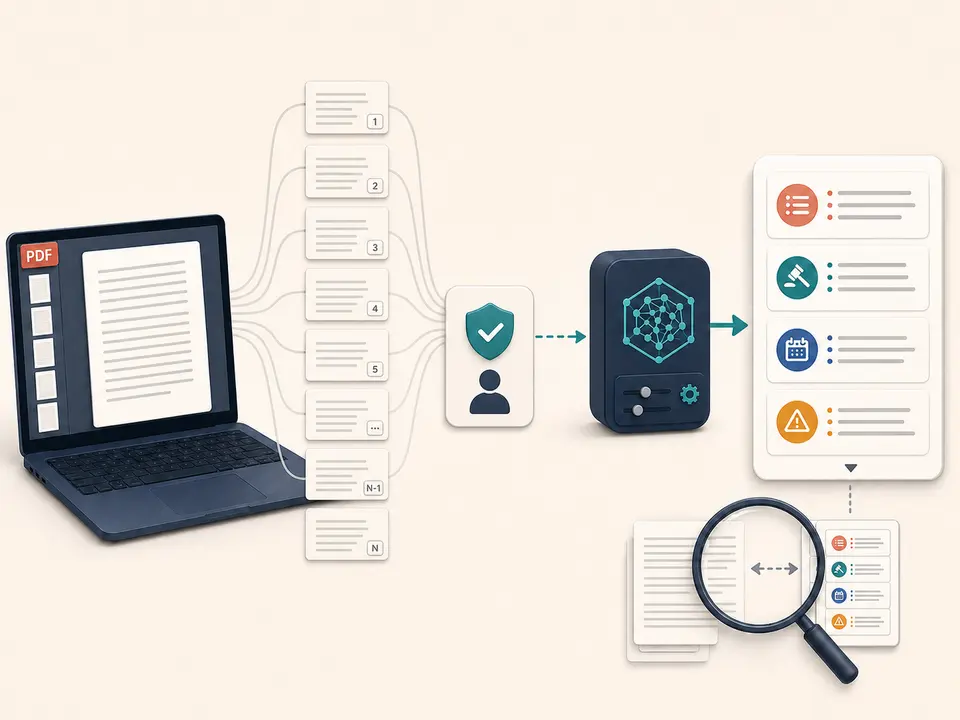
The PDF summarizer reads embedded document text on your device, requests approval before sending that text to the configured AI provider, and returns a concise Markdown brief for careful verification.
The PDF summarizer begins with local PDF.js extraction, not an upload of the source file to the model. It reads embedded text from every permitted page, inserts page markers and waits for explicit remote-processing approval. The approved text then travels through TiPDF's server to the deployment's configured OpenAI-compatible endpoint.
The PDF summarizer instruction asks for a faithful executive summary covering key points, decisions, dates and caveats without inventing missing facts. A system message also treats document text as untrusted and tells the model to ignore commands inside it. This gives the AI PDF summarizer a defined task, but it cannot guarantee that every material clause receives equal weight.
The PDF summarizer response is a new Markdown artifact, not a shortened PDF. Images, typography, page geometry, signatures and interactive features are not carried into that file. A concise brief inevitably omits detail; it should help readers plan their review, never replace the authoritative document.
Choose one authentic .pdf up to 100 MiB and 500 pages for the PDF summarizer. TiPDF checks the signature and parser locally. Unlock protected material only when authorized. The extractor does not OCR scans, read diagrams or infer text from photographs, so a visual-only source needs the separate OCR PDF workflow and human correction first.
The PDF summarizer API accepts no more than 150,000 characters, including page markers. Empty extraction triggers a Run OCR first error, while excessive context is rejected instead of silently reduced. To summarize PDF material longer than the cap, split it along stable section boundaries and label each resulting brief so cross-section dependencies remain visible.
The output uses UTF-8 Markdown and a summarize filename suffix. The endpoint requires a configured API key, supports an HTTP or HTTPS compatible base URL, applies a 120-second timeout and enforces a 30-second minimum interval for the request key. It returns one model response; no extractive highlight file, source-linked citation table or regenerated PDF is promised.
Decide whether you need orientation, meeting preparation or a study aid. A legal digest and an executive overview require different human checks even though the automated instruction stays the same.
Select a sentence in the source. Run OCR first for image-only pages, then correct names, numbers and headings before using the PDF summarizer.
Extracted text will leave the device for the configured provider. Continue only when policy and sensitivity allow that transfer.
The PDF summarizer sends page-marked text with the faithful-summary instruction and saves the returned answer as Markdown. Do not interrupt a legitimate request unless you want to cancel it.
Compare the brief with the contents, introduction, conclusion, tables and exceptional clauses. Mark what was verified, what was absent and what requires a specialist.
Use a PDF summarizer to preview a long report's stated decisions, dates and reservations before reading relevant sections in full.
Compare the AI PDF summarizer output with the abstract, methods and limitations. It cannot judge evidence quality or detect a flawed study independently.
Build a candidate checklist from documented actions and caveats, then verify owners and deadlines before assigning work.
Summarize PDF notes into a compact refresher. Return to original definitions and examples because compression can remove the context needed for understanding.
A summary trades coverage for brevity. The model may emphasize repeated themes while missing a short exception, footnote or appendix. Before it receives the text, extraction may already have reordered columns, flattened tables or separated captions. The PDF summarizer has no independent view of page images to repair those losses.
Faithful wording in the prompt does not certify the result. Check quotations, totals, dates, names, conditions and negatives against the source. If two passages conflict, the summary may resolve them incorrectly instead of preserving the disagreement. Regulated, contractual, medical and financial documents need qualified review rather than automated condensation alone.
PDF summarizer extraction runs in browser memory. After approval, the page-marked text and summarization instruction are sent through the TiPDF server to the configured provider. Original PDF bytes are not part of this AI request, but text can still reveal the document's sensitive substance.
Retention, logging and provider access depend on each deployment; there is no universal automatic-deletion promise. The generated Markdown stays in the interface and its downloaded copy remains on the device. Remove unnecessary confidential sections or avoid remote summarization whenever policy requires local-only handling.
The page has no checkout or account requirement, but the configured AI provider and deployment determine availability.
Not directly. Scans need OCR first, followed by review of recognition errors and specialist terms.
No. A summary compresses content and can omit a short exception, footnote or appendix. Audit it against the source.
No. It creates a Markdown summary from extracted text and leaves the source file unchanged.
Not in one request. Split the source into meaningful sections and reconcile the briefs manually.
No. Page markers are supplied as context, but citation output is not enforced.
Use it only for orientation. A model can miss exceptions or alter meaning; qualified review of the complete source remains necessary.
Ask one focused question about locally extracted PDF text after reviewing and approving the transfer.
Analyze locally extracted and explicitly approved PDF text for claims, risks, actions and open questions.
Use the AI question generator from PDF for 12 reviewable questions with concise answers.
Translate approved embedded PDF text into one of six languages and review the Markdown draft.
PDF summarizer claims were verified on July 18, 2026 against local page-marked text extraction, explicit approval, the 150,000-character schema, faithful-summary instruction, injection boundary, configured chat-completions call and Markdown artifact. OCR, layout preservation, complete coverage, citations and guaranteed correctness are excluded.