Distributing meeting notes
Use TXT to PDF for a predictable reading copy without introducing design choices.
Drop files here
Use TXT to PDF when plain UTF-8 notes, logs or drafts need stable pages. TiPDF reads one text file locally, wraps measured lines and writes searchable text into portrait A4 without inventing rich formatting.
The TXT to PDF converter validates one .txt source and decodes its bytes as UTF-8 with replacement for malformed sequences. Empty or whitespace-only input is rejected. TXT to PDF creates a new document, attempts to subset the bundled Unicode font, and otherwise falls back to Helvetica.
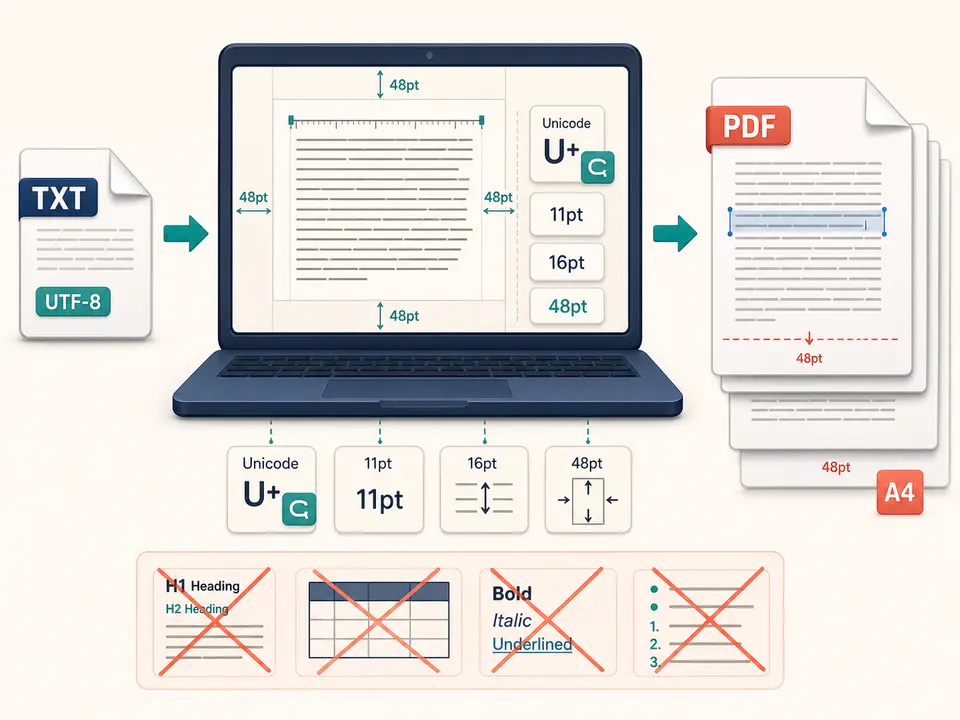
TXT to PDF measures text at 11 points and wraps it to the available width. Each line advances by 16 points within a portrait A4 page measuring 595.28 by 841.89 PDF points. A 48-point margin surrounds the content; when the next line would cross the lower boundary, a fresh page begins. Blank source lines remain vertical gaps.
Characters are written as actual PDF text, so they can generally be selected and searched when the embedded font supports them. The process does not interpret headings, lists, Markdown, RTF commands, tabs as tables or page-break directives.
TXT to PDF accepts one .txt file with local validation and the normal browser-side size limit. A TextDecoder reads UTF-8 without fatal mode, so invalid byte runs can become replacement characters rather than producing an immediate error. Review the source encoding when exact characters matter.
TXT to PDF subsets the bundled Unicode font when available. If that resource fails, Helvetica can represent only printable ASCII plus tabs and line endings; unsupported characters become square placeholders. That visible fallback should trigger a retry or another approved workflow, not silent acceptance.
The text to PDF path reads no embedded styles because TXT has none. It also performs no language detection, OCR, syntax highlighting, hyphenation or automatic correction.
Open the source in a trusted editor, choose UTF-8 and inspect punctuation, non-Latin scripts and line endings.
Insert intentional paragraph breaks where machine-generated logs or exported data would otherwise be difficult to scan.
Plain text can contain tokens, paths, email addresses or customer data. Delete or redact them in an authorized copy before conversion.
The browser decodes, measures and wraps each line using fixed typography and adds pages as needed.
Check characters, wrapping, blank lines, page boundaries and text extraction in the downloaded document before sharing.
Use TXT to PDF for a predictable reading copy without introducing design choices.
Create paginated evidence from an authorized export, while retaining the source and hashes when chain of custody matters. Very long unbroken tokens may be visually awkward.
Preserve literal characters as simple text, but use the Markdown tool when headings, code blocks or lists require visual structure.
Use the Unicode font path for readable scripts and verify every glyph. The generated file has no cover page, header, footer, line numbers or author metadata added automatically.
Layout is intentionally fixed: portrait A4, 48-point margins, 11-point type and 16-point line height. The wrap function measures glyph widths rather than assuming a character count, but it does not perform editorial hyphenation, widow control, columns, justification or semantic page breaks. A small source change can move later lines onto another page.
Tabs and consecutive spaces are plain characters subject to font measurement; they do not create reliable spreadsheet columns. Extremely long tokens must be broken by the wrapper and should be checked closely. Newline conventions are normalized by decoding and wrapping behavior.
A txt to PDF converter makes a convenient reading artifact, not a typesetting system. For branded reports, tables or complex hierarchy, author the content in an appropriate document format and use its dedicated conversion route.
File reading, UTF-8 decoding, font subsetting, line measurement and PDF writing occur in browser memory on the current device. This route does not send the source to conversion servers, storage, sharing or AI and requests no remote approval. The bundled font or normal site resources may still be fetched.
The output contains selectable text, so copying and automated indexing may expose information more readily than a screenshot. Local conversion is not encryption, access control or redaction. Inspect credentials, internal hostnames, personal data and hidden trailing lines before distribution.
TiPDF cannot delete the source, downloaded artifact, editor backups or copies shared later. Apply retention rules and use Protect PDF separately when password encryption is actually required.
Yes. This local workflow has no checkout requirement, subject to the browser file limit.
Yes, supported characters are drawn as text rather than page images.
No. Markdown symbols remain literal; use the dedicated Markdown workflow.
The non-fatal decoder may insert replacement characters, so review the result.
No. Typography and portrait A4 geometry are fixed.
The Unicode font may not have loaded, causing unsupported fallback characters to be replaced.
Typeset supported Markdown blocks locally into a paginated A4 PDF with raw HTML disabled.
Send one approved Word file to the configured office renderer and verify the returned PDF.
Upload one approved self-contained HTML file to the configured Chromium service after active and external resources are rejected.
Route one supported file through the appropriate local or approved remote conversion path.
Plain-text capability copy was verified on July 18, 2026 against TXT-only validation, non-fatal UTF-8 decoding, empty-input rejection, bundled Unicode font subsetting, Helvetica fallback, 11-point type, 16-point line height, 48-point margins and 595.28 × 841.89 portrait pages. Fixtures cover multilingual text, malformed bytes, blank lines, long tokens and multi-page wrapping. The convert TXT to PDF workflow excludes rich-format inference, OCR, syntax highlighting, page controls, headers and encryption. A second convert TXT to PDF check verifies selection and search in the resulting artifact.