Sharing administrative forms
Use HWP to PDF when recipients lack the Hangul editor, after confirming all fields and seals visually.
Drop files here
Use HWP to PDF only when the configured private document service supports the source format. TiPDF obtains approval, submits one file and validates a successful PDF response without promising universal HWP compatibility.
The HWP to PDF converter registers .hwp as an office source, but decoding belongs to the configured Gotenberg LibreOffice installation. After approval, HWP to PDF forwards the complete file through TiPDF to that private endpoint. The browser does not parse or reconstruct Hangul document structures.
HWP to PDF works only when the service has a compatible import filter for supported text, paragraphs, tables, images, page styles and objects. If support is missing or the HWP generation is incompatible, the service may reject the file. TiPDF reports that failure rather than claiming conversion occurred.
A successful response still must begin with a PDF signature. HTTP errors, timeouts and invalid bytes are rejected. The application returns the validated rendering with a sanitized filename and does not repair layout after export.
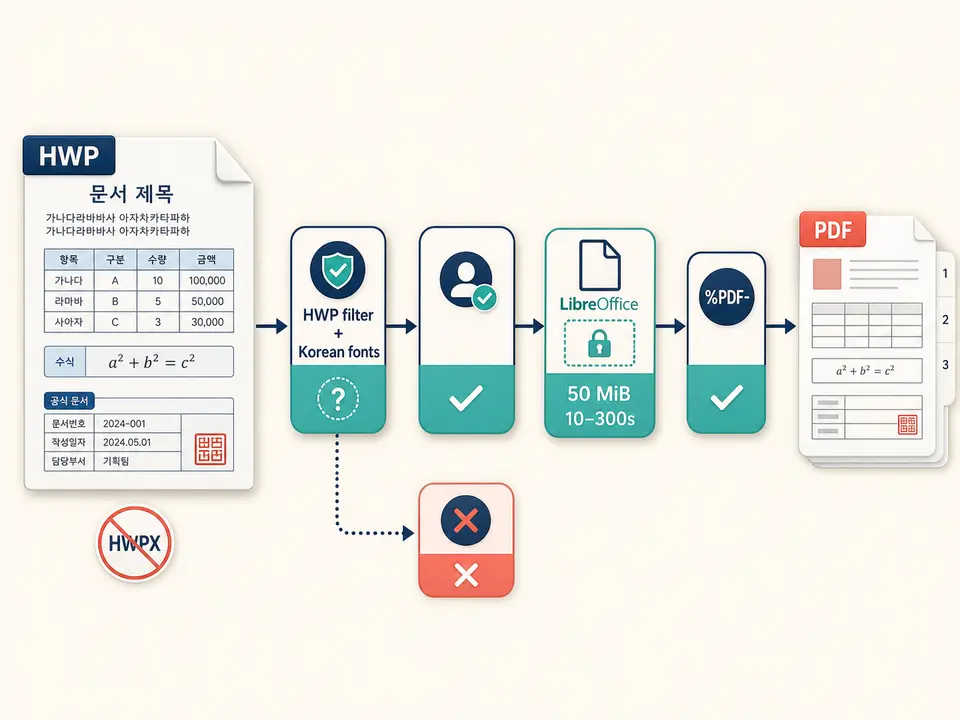
HWP to PDF accepts one .hwp no larger than 50 MiB. The extension passes the office-file rule, but that does not prove readability by every LibreOffice build. Older binary HWP, newer structures, embedded objects, encryption or damage can behave differently. HWPX is not accepted.
HWP to PDF needs a configured HTTP(S) Gotenberg URL. The request uses LibreOffice, includes a trace identifier and has a 10–300-second timeout, normally 120. Missing configuration stops the request.
Font availability is especially important for Korean text and layout. The service needs appropriate Hangul fonts and import filters. Linked resources, macros and proprietary embedded objects are not guaranteed, and the tool cannot install missing compatibility components on demand.
Record the authoring application and version, and confirm the file opens correctly in an authorized editor.
Resolve changes, remove hidden information, embed images and save the approved version.
Ask whether the configured renderer includes an HWP import filter and suitable Korean fonts.
Approve the complete-file upload, submit once and wait for the bounded service response.
Inspect every Korean glyph, table, formula, image, header, footer and page break against the trusted source before relying on the result.
Use HWP to PDF when recipients lack the Hangul editor, after confirming all fields and seals visually.
Render an approved version for a system that requires PDF, while preserving the authoritative source and version details.
Produce a convenience copy from an older file only when the service opens it successfully and the output is compared page by page.
Use the renderer's page result for ordinary printing after checking fonts and dimensions. Conversion does not establish archival conformance, legal authenticity, OCR, a digital signature or exact proprietary-feature preservation.
HWP documents can depend on Korean font metrics, character spacing, vertical positioning, section settings, equations, tables, drawings and proprietary embedded controls. A substitute font may change line breaks and move all later pages. An import filter may simplify objects it does not fully understand.
The source and service decide paper size, margins and pagination. This web page offers no orientation, font mapping, fallback, image quality or compatibility settings. Even when the renderer returns a valid PDF, validity proves file structure, not visual fidelity.
The workflow must therefore be treated as conditional. Test the actual document family, compare dense Korean pages and print a representative sample. If the service rejects the source or changes essential content, export from an authorized native editor instead of repeated blind attempts.
The workflow uploads the full approved HWP through TiPDF's server to the configured Gotenberg service. It is not device-only. Deployment administrators control transport, endpoint permissions, logging, temporary files and retention. Compatibility troubleshooting may also expose filenames or error details in service logs.
HWP sources can contain personal identifiers, government forms, hidden revisions, document properties and embedded assets. Review an authorized copy before approval. Rendering does not redact, anonymize or remove metadata by policy, and the returned PDF may preserve selectable sensitive text.
Manage the download under the same classification as the source. Later password protection cannot reverse the approved disclosure to the renderer, and TiPDF cannot remove copies saved or shared outside the application.
The page has no checkout, but deployment access and renderer compatibility determine availability.
No. Success depends on the service's import filter and source generation.
No. This route registers .hwp only.
Missing or substituted fonts can change glyph metrics and pagination.
One approved HWP up to 50 MiB.
No. It proves a PDF response; users must compare visible content.
Send one approved Word file to the configured office renderer and verify the returned PDF.
Use ODT to PDF for one approved 50 MiB private-renderer request.
Route one supported file through the appropriate local or approved remote conversion path.
Use TXT to PDF for one searchable local A4 document with fixed typography.
HWP to PDF capability copy was verified on July 18, 2026 against HWP registration, the 50 MiB server guard, explicit approval, configured HTTP(S) Gotenberg, LibreOffice routing, trace identifiers, 10–300-second timeout bounds and returned PDF signature validation. Verification deliberately covers both a service with compatible HWP import support and a rejection path when support is absent, plus Korean-font substitution review. The convert HWP to PDF route excludes universal compatibility, HWPX acceptance, local-only processing, native-layout guarantees, OCR, PDF/A and encryption. A second convert HWP to PDF check compares tables and page breaks with a trusted native rendering.