Submitting photographed records
Place authorized receipts, labels or site photos into a single ordered packet. Add searchable descriptions separately because pixels are not OCR text.
Drop files here
Convert HEIC to PDF when phone photos need a familiar document package. TiPDF loads a HEIC decoder in the browser, creates a JPEG representation locally and gives every successful image its own portrait A4 page.
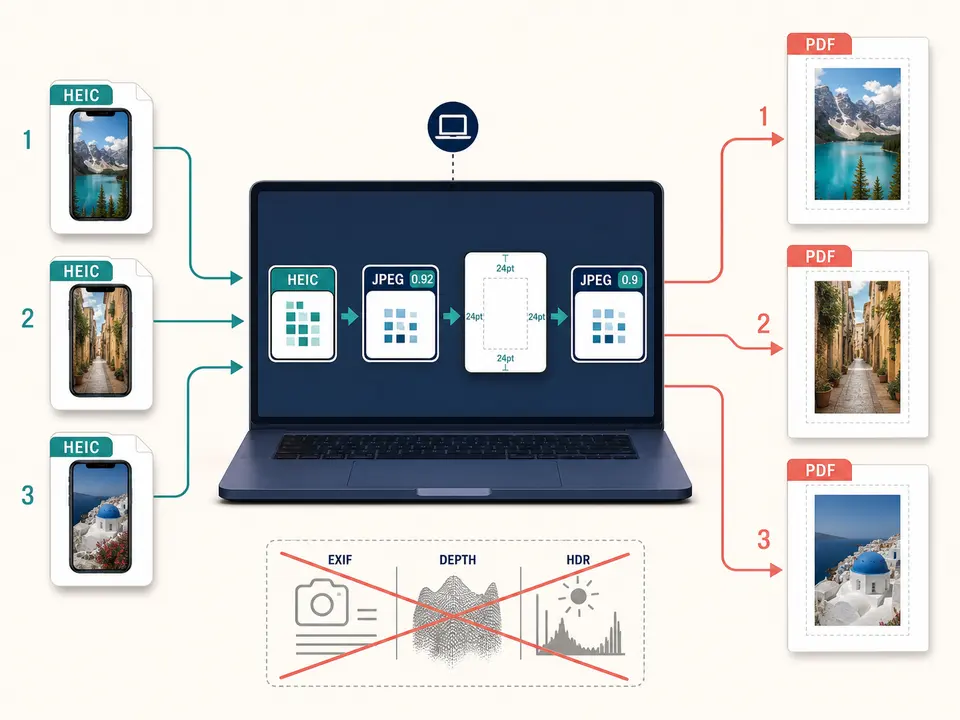
The HEIC to PDF converter validates selected files, then lazy-loads a browser-side HEIC decoder. Each source becomes a JPEG blob at quality 0.92. That HEIC to PDF intermediate is decoded as an ordinary image and drawn onto a same-size white canvas.
HEIC to PDF then exports the canvas as JPEG at quality 0.9 before adding it to the document. Because two lossy stages can occur, the result is not the original HEIC payload, a lossless master or a metadata-preserving wrapper. It is a practical viewing derivative.
A portrait A4 page is created for each decoded image. The photo stays proportional inside a box inset by 24 PDF points. Large photos shrink; small photos are not enlarged. Page sequence follows the user's selection, and all pages are saved into one artifact.
HEIC to PDF accepts one to 100 .heic files, with a maximum local size of 100 MiB each. Content-signature checks reject an unrelated file renamed with the extension. The decoder must also recognize the particular container and image item. Unsupported variants, malformed data or memory allocation failure stop conversion instead of silently dropping a photo.
Each HEIC to PDF canvas may contain at most 80 million pixels, and the task at most 250 million decoded pixels in total. Compressed byte size is not a reliable estimate of browser memory. Very high-resolution phone images can reach the aggregate limit quickly.
The implementation treats each selected source as one photo result. It does not expose selection among auxiliary images, depth maps, bursts or alternate representations that a container may hold. Export a deliberate ordinary image first when one of those assets is required.
Review edits, orientation, crop and visible sensitive details before choosing files.
Select images in document sequence; capture time and filenames do not reorder them.
Estimate the combined pixel count and downsize authorized copies when many full-resolution photos exceed the memory boundary.
The local decoder creates JPEG 0.92, the page pipeline composites onto white and emits JPEG 0.9 inside portrait A4.
Compare rotation, color, detail, page count, order and margins against the intended photos. Preserve originals because the output passes through lossy encoding.
Place authorized receipts, labels or site photos into a single ordered packet. Add searchable descriptions separately because pixels are not OCR text.
Arrange field images on consistent pages for review while keeping full-resolution evidence and hashes under the appropriate record policy.
Give each photo an uncluttered page instead of squeezing several thumbnails together. The tool does not print filenames, dates or captions.
Use fixed portrait sheets for convenient printing, then verify color and physical scale. This is not a calibrated prepress, archival or forensic conversion service.
HEIC can encode wide color, high dynamic range, orientation and camera metadata efficiently. Browser conversion to JPEG 0.92 may normalize those properties, and the later JPEG 0.9 canvas export can add another generation of loss. Fine foliage, text, gradients and low-light noise deserve close review. Transparency, when a decoder supplies it, is flattened onto white.
Photos larger than the content box scale down proportionally. Smaller decoded images remain centered without enlargement, so the apparent print size can be modest. There is no landscape switch, custom paper, margin, crop, rotation, DPI, color-profile or quality control.
A phone viewer and the generated page may render color differently. Check representative skin tones, neutral grays and saturated areas on the intended display or printer. Archive the HEIC originals whenever capture metadata or maximum fidelity matters.
Selected photo bytes, intermediate JPEG data, canvas pixels and PDF assembly stay in browser memory on the current device. This route does not upload photos to conversion servers, storage, sharing or AI systems and does not require a remote approval step. Decoder code and ordinary web assets may still be fetched.
Device-local work does not remove the privacy of what a photo depicts. Faces, location clues, screens, serial numbers and documents may remain visible even if EXIF is not intentionally carried into the page. Inspect and redact through an approved workflow before distribution.
The downloaded document and sources remain under local device controls. TiPDF cannot erase photo-library copies, synced backups, exported intermediates or later shares.
Yes. This local workflow has no checkout requirement, subject to file and pixel limits.
Yes. Up to 100 selected sources become one page each in order.
No. The image passes through JPEG 0.92 and JPEG 0.9 stages.
No guarantee is made for EXIF, depth, HDR or auxiliary items.
No. This workflow performs no OCR.
No. Output pages use fixed portrait A4 geometry.
Use Image to PDF for mixed supported formats with one local A4 page per decoded canvas.
Combine JPG or JPEG images locally into one ordered A4 PDF with one image per page.
Apply a fixed document-style treatment to existing images and assemble them as one image-based PDF.
Combine up to 100 PNG files locally into one ordered A4 PDF with white transparency flattening.
HEIC to PDF capability copy was verified on July 18, 2026 against HEIC signature registration, lazy local decoder loading, JPEG 0.92 intermediate conversion, ordinary white-canvas drawing, 80/250-million pixel limits, JPEG 0.9 page embedding, 24-point margins and portrait A4 dimensions. Fixtures check ordered multi-photo output, decoded failures and stable one-source-to-one-page behavior. The convert HEIC to PDF path excludes original-bitstream embedding, OCR, metadata guarantees, auxiliary image selection, enlargement and landscape layout. A second convert HEIC to PDF check compares representative fine detail before and after the two encoding stages.