Combining a submission packet
Use ZIP to PDF for related word-processing, spreadsheet and presentation sources arranged in deliberate archive order.
Drop files here
Use ZIP to PDF for an authorized archive of supported office and ebook documents, not a generic image bundle. TiPDF checks archive limits, renders eligible entries through the private service and merges their validated pages in archive order.
The ZIP to PDF converter accepts one approved archive up to the 50 MiB server upload limit. For ZIP to PDF processing, JSZip reads the central directory without expanding every entry for CRC checks. Directories and macOS metadata paths beginning with __MACOSX/ are excluded from the document list.
The workflow filters remaining entries to supported office and ebook extensions, checks declared uncompressed sizes, then expands eligible files one at a time while tracking actual bytes. Each supported document is sent separately to the configured Gotenberg renderer. Its validated PDF pages are copied into one new output in archive entry order.
This is not a shortcut for arbitrary files. JPG, PNG and other images are outside the archive conversion set, nested ZIP files are not recursively opened, and unsupported entries are skipped. If no convertible document remains, the task stops instead of returning an empty PDF.
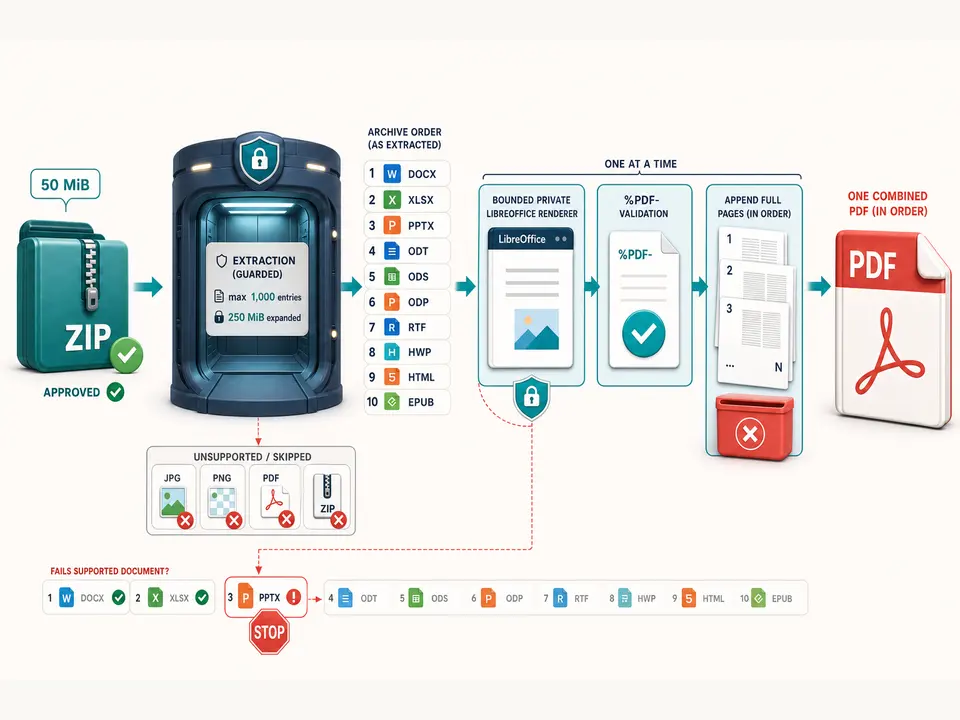
A ZIP to PDF request accepts one .zip no larger than 50 MiB. It can contain DOC, DOCX, XLS, XLSX, PPT, PPTX, RTF, ODT, ODP, ODS, HWP, HTML, HTM or EPUB entries. Actual rendering still depends on the configured LibreOffice service. Images, PDFs and nested archives are not accepted by this route.
After directories and __MACOSX metadata are removed, the archive allows at most 1,000 file entries. Supported entries must report safe integer uncompressed sizes, and their declared total cannot exceed 250 MiB. Actual expanded bytes are counted again and must remain within the same ceiling, limiting deceptive compression ratios.
Standalone HTML entries also pass HTML safety checks: scripts, frames, refresh directives, imports and non-data external resources are rejected. A damaged archive or invalid entry size fails the complete job.
Remove images, PDFs, nested ZIPs and unrelated files rather than assuming they will become pages.
Add entries in the exact sequence intended for the merged document; filenames alone are not a promised sorting control.
Open office files safely, resolve revisions, update calculations and remove hidden or unauthorized data.
Approve the complete archive upload and wait while eligible entries expand, render and merge on the server.
Compare eligible entry count, entry sequence, individual page counts and transition boundaries in the combined PDF.
Use ZIP to PDF for related word-processing, spreadsheet and presentation sources arranged in deliberate archive order.
Run ODT, ODS and ODP entries through the same configured office environment before merging their fixed pages.
Use batch files to PDF only when every supported document is authorized and the archive stays within entry and expansion limits.
Join validated page results while retaining the archive and individual sources for edits. The output does not preserve editable objects, folders, unsupported files, attachments or an automatic table of contents.
Every ZIP to PDF entry inherits the fidelity boundaries of its own format. Fonts can substitute, spreadsheets can paginate widely, presentations lose motion and reflowable ebooks gain fixed breaks. The merge copies complete rendered pages; ZIP to PDF does not normalize paper sizes, margins, orientation, headers, color or scale.
One failed eligible entry stops the operation rather than silently omitting a required document after rendering begins. Unsupported extensions, however, are filtered before conversion. Distinguish those cases by reviewing the archive manifest and final page transitions.
The combined result is useful only with a controlled manifest. Record expected eligible filenames and page counts, inspect every boundary and preserve sources. For image collections, use Image to PDF; for existing PDFs, use Merge PDF instead.
After ZIP to PDF approval, the complete archive reaches TiPDF's server, where supported entries are expanded and sent to the configured Gotenberg service. This is not local-only. Deployment owners control transport, endpoint permissions, logs, temporary extraction and retention. Unsupported entries still arrive inside the uploaded archive even when they are not rendered.
An archive can hide sensitive files, metadata, revision history and extreme compression ratios. Build a dedicated minimal archive, inspect its manifest and never upload unknown ZIPs. Safety limits reduce resource risk but do not classify content or remove secrets.
The combined download may expose selectable data from every rendered source. Apply access and retention rules to the archive, extracted service data and output. Later encryption cannot undo approved processing.
The page has no checkout, but deployment access and the configured renderer determine availability.
No. This route accepts supported office and ebook entries, not JPG or PNG; use Image to PDF for an image collection.
No. Archives are not processed recursively.
One 50 MiB upload, at most 1,000 file entries and 250 MiB of supported expanded data.
They are not rendered; ZIP to PDF fails if no supported entry exists.
Converted documents are appended in archive entry order.
Use Image to PDF for mixed supported formats with one local A4 page per decoded canvas.
Combine complete PDF files in a deliberate sequence without rendering their pages as images.
Route one supported file through the appropriate local or approved remote conversion path.
Combine JPG or JPEG images locally into one ordered A4 PDF with one image per page.
ZIP to PDF capability copy was verified on July 18, 2026 against the 50 MiB outer upload guard, explicit approval, JSZip parsing, directory and __MACOSX filtering, the 1,000-entry ceiling, declared and actual 250 MiB expansion guards, the exact convertible-extension set, per-entry Gotenberg rendering, PDF signature checks and page copying in archive order. Fixtures cover mixed supported formats, unsupported entries, nested archives, safe standalone HTML, deceptive compression, invalid sizes and one-entry failure. The convert ZIP to PDF route excludes image batches, recursive archives, filename sorting guarantees, partial success, local-only processing and layout normalization. A second convert ZIP to PDF review checks every merged boundary.