Repeated footer identifiers
Use Redact PDF when an identifier occupies exactly the same coordinates on selected pages. Verify pages with different dimensions separately.
Drop files here
Redact PDF content with one precisely entered rectangle on all or selected pages. TiPDF renders every page to pixels, paints the chosen regions black and builds a new image-based PDF locally.
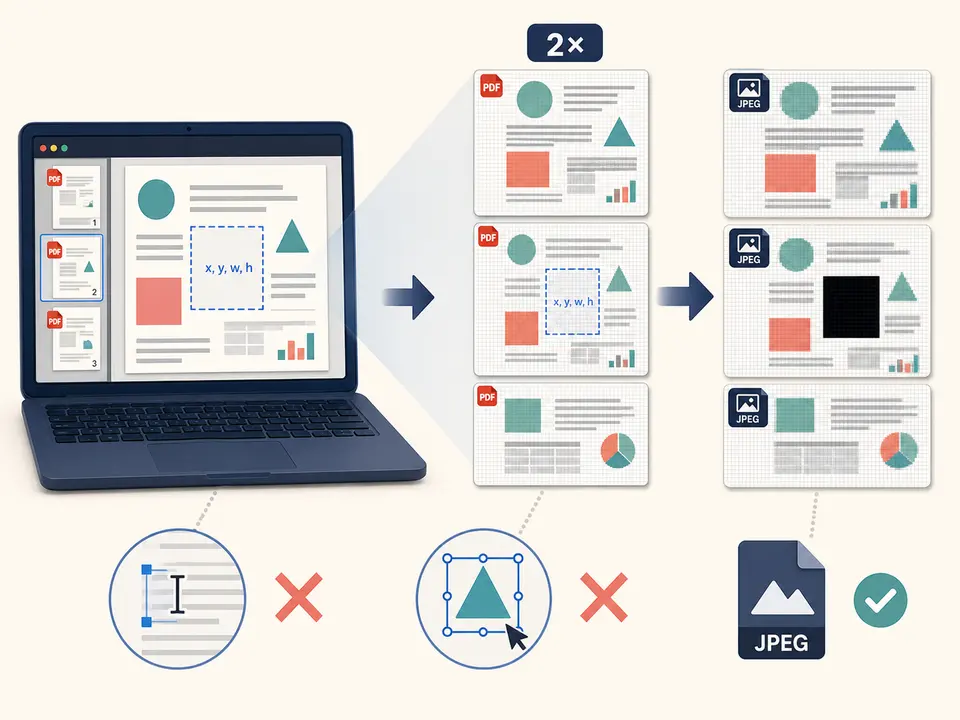
A normal PDF rectangle drawn over text can leave the underlying words searchable, selectable or recoverable. Redact PDF instead renders every source page at twice its PDF dimensions, applies an opaque black fill on selected page canvases and embeds each finished canvas as a JPEG image in a new PDF. The old text and vector objects are not copied into the derivative.
Redact PDF applies one x,y,width,height rectangle to every selected page. Coordinates use PDF points from the bottom-left of each original page, while the renderer converts them to the canvas's top-left pixel system. The rectangle must have positive dimensions and remain fully inside every selected page.
Redact PDF provides destructive visual removal inside the generated file, but it has a major cost: all pages, including unselected ones, become images. Searchable text, vector geometry, form fields, links, tags and certificate signatures are not preserved as original structures. A PDF redactor must therefore be followed by close visual and metadata review.
Select one valid .pdf up to 100 MiB and 500 pages for Redact PDF. The local validator checks its signature and PDF.js readability. Encrypted material must be unlocked with authorization. Browser rendering is also limited to 250 million decoded pixels across the job, so a very long or unusually large-page document can stop before completion.
Enter the Redact PDF rectangle as four comma-separated PDF-point values: x,y,width,height. The default 40,40,200,40 begins 40 points from the left and bottom, spans 200 points horizontally and 40 vertically. The same geometry is tested on each selected page; mixed page sizes can make a rectangle valid on one page and invalid on another.
All pages are rendered at scale 2 and encoded as JPEG quality 0.9, then placed on new pages with the original point width and height. The output receives a redacted suffix. There is no visual drag editor, multiple rectangles, color choice, pattern matching or automatic sensitive-data discovery.
Preserve the original under appropriate controls and decide exactly what information must be removed from the derivative.
Measure x and y from the page's bottom-left in PDF points, plus positive width and height. Account for different page sizes and rotations.
Enter all, numbers, ranges, odd or even. One geometry applies to every selected page, so split jobs when regions differ.
The browser renders the complete document, paints black pixels on selected canvases and rebuilds every page as a JPEG image.
After you redact PDF content, zoom each region, extract text, search known terms, inspect metadata and attachments, and compare every page. Have another reviewer check high-risk material before release.
Use Redact PDF when an identifier occupies exactly the same coordinates on selected pages. Verify pages with different dimensions separately.
Use the PDF redactor for a known box, then test that nearby labels or values are not clipped and that hidden copies are absent elsewhere.
Create a flattened derivative when loss of search and vector structure is acceptable. Keep accessible or archival masters under separate control.
Redact PDF online only after confirming local browser processing fits policy, and never assume one rectangle finds every occurrence of a name or number.
Every page is rasterized at 2× and encoded with lossy JPEG quality 0.9. This usually retains readable appearance, but fine vectors, small text, gradients and diagrams can soften or show compression artifacts. Output size can increase or decrease. There is no fallback to the original when the result is larger.
When you redact PDF pages this way, the image PDF no longer provides original selectable text, semantic reading order, live links or interactive forms. Screen readers cannot recover meaning from pixels, and OCR is not automatically added after redaction. If accessibility is required, create a carefully reviewed accessible derivative without reintroducing removed information. Never place an OCR layer containing the redacted source text.
Rendering, painting and rebuilding occur in browser memory on the current device. The handler does not upload PDF bytes to conversion, storage, sharing or AI services and does not request remote approval. PDF.js code and normal website assets may still be fetched.
The generated file removes source page objects by replacing pages with images, but TiPDF does not erase the original, downloads, backups, clipboard data or prior shares. It also does not scan document metadata or attachments for secrets. A permanent redaction workflow needs custody controls and a documented review beyond the visible rectangle.
Yes. The local workflow has no checkout or account requirement, subject to file, page and pixel limits.
This derivative rasterizes every page, paints the rectangle and does not copy original page objects. Metadata and attachments still need separate inspection.
No. You must provide one rectangle and select pages; there is no name, number or pattern discovery.
No. When you redact PDF content here, output pages are newly rendered images, so original page text and vectors are not copied beneath the rectangle.
Not currently. Enter x,y,width,height in PDF points measured from the bottom-left.
Not in one run. The same rectangle applies to all selected pages.
No. Every page becomes a JPEG image and OCR is not added.
Not proven. Inspect the complete output and use specialist sanitization for formal disclosure requirements.
Apply AES-256 locally with one shared user/owner password and clearly defined PDF permission flags.
Use Flatten PDF for supported layers, form fields and annotations with exact counts.
Add a visible text note to selected PDF pages without replacing existing content.
Upload one approved PDF to configured storage and receive an unlisted URL anyone holding it can open.
Redact PDF capability copy was verified on July 18, 2026 against the local PDF.js renderer, coordinate validation, 2× canvas, opaque black fill, JPEG 0.9 encoding and new image-PDF assembly. PDF redactor tests cover regions within bounds and reject invalid rectangles. It accurately states that every page is rasterized and excludes drag selection, multiple regions, discovery, retained searchability, metadata sanitization and automatic OCR.