Sending reviewed records
Use Protect PDF before transmitting a final file through a channel that lacks document-level encryption.
Drop files here
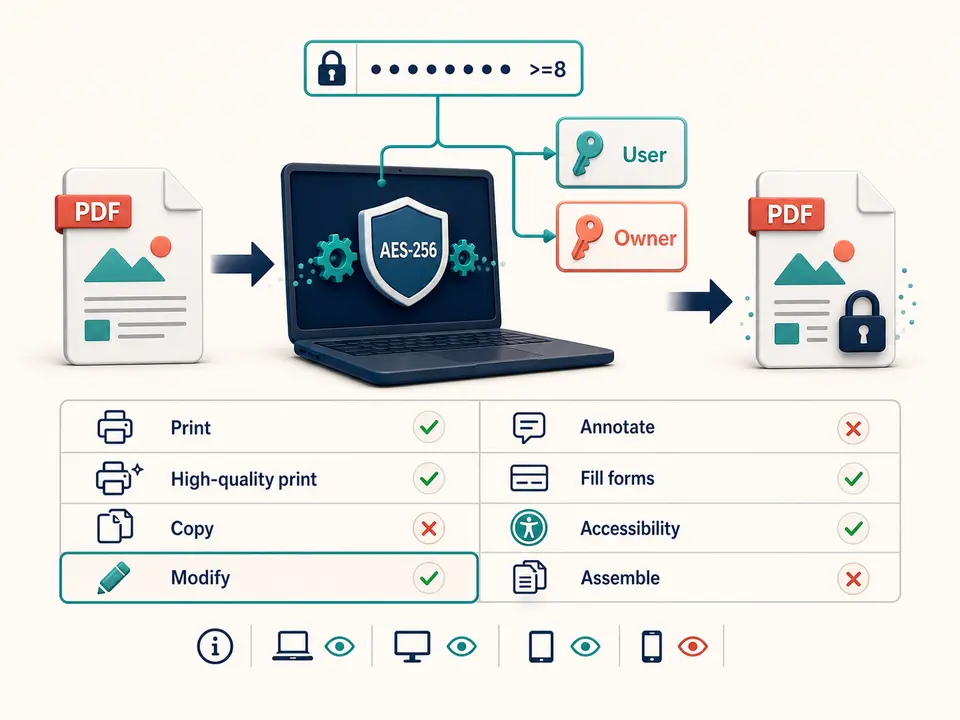
Protect PDF files locally when a reviewed document needs password encryption before storage or sharing. TiPDF applies AES-256 with one password used for both user and owner access, plus explicit permission flags.
The Protect PDF workflow reads one validated document in browser memory and requires a new password at least eight characters long. It loads the file with the local PDF engine, creates a protection dictionary using AES-256 and saves a separate encrypted artifact. The source file is not overwritten.
Protect PDF assigns the same entered value as both user and owner password. That design lets a holder use TiPDF's Unlock tool later without managing a second secret. It is simpler operationally, but it does not create distinct recipient and administrator roles.
Protect PDF permissions allow printing, high-quality printing, form filling, accessibility access and modification. They disallow copying, annotation and document assembly. Modification remains allowed deliberately for compatible password holders and unlock behavior, so the tool must not be described as making every edit impossible. Password enforcement also depends on the PDF viewer honoring permissions.
Select one .pdf that passes Protect PDF signature and readable-document checks. The shared local limit is 100 MiB, and PDFs beyond the supported page guard or with damaged cross-reference data can fail. If the source is already encrypted, unlock it first with authorization before applying a new password.
The Protect PDF password must contain at least eight JavaScript characters after being read from the form. The workflow does not score entropy, require mixed character classes, generate a recovery key or confirm the password in a second field. Users must choose and store a strong unique value through an approved password manager.
Output uses AES-256 through the local PDF engine. Older or limited viewers may not support that encryption or may handle permission flags differently. To protect PDF files reliably, test opening, printing and permitted workflows in recipients' actual viewers before deleting any unencrypted working copy.
Resolve comments, remove hidden data, verify redactions and create the exact distribution copy before encryption.
Use a unique password substantially stronger than the eight-character minimum and store it separately from the document.
Enter the new password once and let the browser apply AES-256 and the defined permission flags.
Open the protected result in at least two intended viewers, verify the password, printing, form filling and restricted operations.
Transmit the document and password independently, limit recipients and retain an authorized recovery copy according to policy.
Use Protect PDF before transmitting a final file through a channel that lacks document-level encryption.
Reduce casual access to a PDF placed on removable media or a shared folder, while preserving stronger device and folder controls.
Permit form filling and accessibility while discouraging copying, annotation and assembly in compliant viewers.
Give authorized holders the same password needed for reading and later local unlocking. This is not identity-based access, expiry, revocation, digital rights management or proof of recipient identity.
AES-256 protects encrypted PDF bytes against reading without the password when the password itself is strong. A short, reused or predictable secret weakens the practical result. Encryption does not hide filenames, file size, sharing history, screen captures or content copied after an authorized user opens the file.
Permission flags are different from encryption. Many viewers honor copy, annotation and assembly restrictions, but software may ignore them after successful decryption. Because modification is allowed in this implementation, protect PDF does not mean make PDF non-editable. Use Flatten PDF to make supported form and annotation appearances permanent, and Redact PDF to remove sensitive visible regions.
The workflow does not add certificates, digital signatures, expiration, online revocation or recipient accounts. Those require separate systems and policies. Test recovery procedures with a noncritical sample before relying on encrypted copies for long-term access.
PDF reading, password application, AES-256 encryption and output writing happen in browser memory on the current device. The document and entered password are not sent to conversion, storage, sharing or AI services by this handler. Normal application resources may still be fetched from the site.
When you protect PDF content locally, endpoint security still matters. Malware, browser extensions, screen recording, clipboard tools or an unlocked device can expose the source, password or decrypted content. Clear sensitive downloads and follow device policy after work.
TiPDF does not retain or recover the password. Losing it can make the file inaccessible, while sharing it broadly defeats protection. Keep an authorized recovery process and never place the secret in the same message as the document.
The local PDF engine applies AES-256.
No. The entered value is used for both user and owner access.
No. Modification is allowed, while copy, annotation and assembly permissions are disabled.
No. Test AES-256 support in recipient viewers and send the password through a separate approved channel.
No. Store the secret through an approved recovery process.
No. Authorized viewers can still see the complete document; redact sensitive data separately.
Authenticate a supported encrypted PDF with its known password and save a separate unlocked copy locally.
Use Redact PDF to rasterize every page and paint one validated black rectangle.
Use Flatten PDF for supported layers, form fields and annotations with exact counts.
Upload one approved PDF to configured storage and receive an unlisted URL anyone holding it can open.
Protect PDF capability copy was verified on July 18, 2026 against local PDF validation, the eight-character minimum, one shared user/owner password, AES-256 selection and the exact permission dictionary: print and high-quality print allowed, copy disallowed, modify allowed, annotate disallowed, fill forms allowed, accessibility allowed and assemble disallowed. Tests open the artifact with correct and incorrect passwords, inspect encryption metadata, exercise permissions and unlock it with the same secret. The password protect PDF workflow excludes separate owner credentials, password recovery, universal viewer enforcement, redaction, signatures, expiry and revocation. A second encrypt PDF check confirms source bytes remain unchanged while a distinct protected download is created.