Preparing authorized print copies
Use EPUB to PDF for fixed sheets when rights permit, then verify margins and type size on paper.
Drop files here
Use EPUB to PDF when an authorized reflowable ebook needs a fixed reading or printing copy. TiPDF requests approval, sends one unprotected file to the configured private renderer and validates the PDF response.
The EPUB to PDF converter handles an ebook as a server-rendered office source. After explicit approval, EPUB to PDF sends the complete package through TiPDF to the configured Gotenberg LibreOffice endpoint. The browser does not unpack, style or paginate chapters itself.
EPUB to PDF relies on the service for supported XHTML, CSS, embedded fonts, images, navigation and metadata. Page count, line breaks and image placement follow the renderer rather than an ebook reader's adjustable settings. Interactive scripts, media and reader controls are not reproduced as normal PDF behavior.
TiPDF requires a successful response whose leading bytes identify a PDF. It rejects timeouts, service errors and malformed output. The valid result is named from the source and returned without an additional browser-side pagination pass.
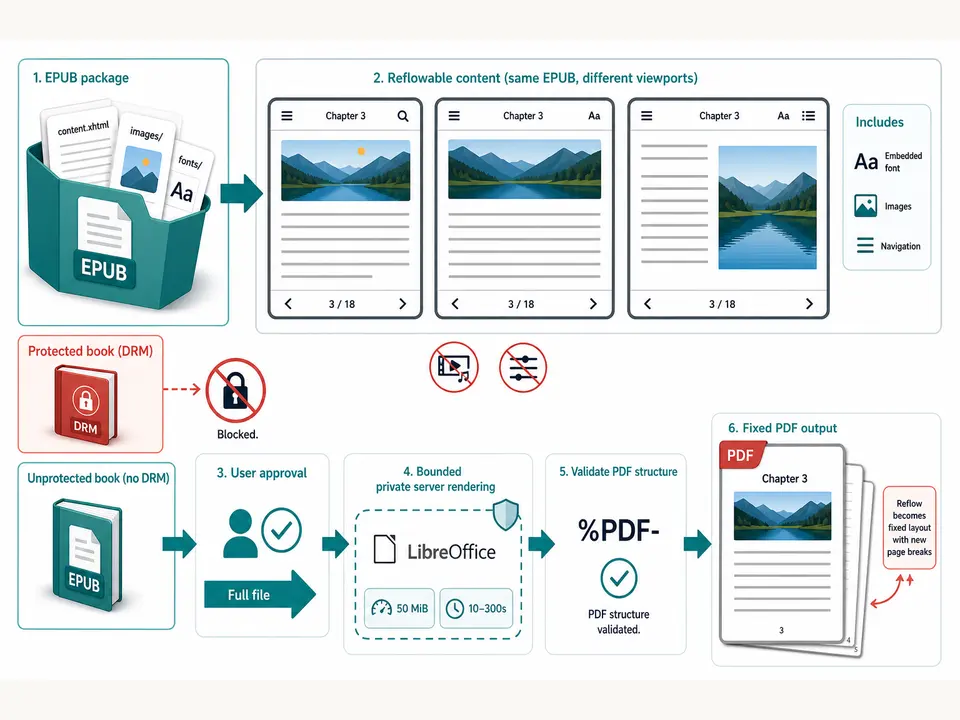
EPUB to PDF accepts one .epub no larger than 50 MiB. It must be authorized and readable by the configured import filter. Damaged ZIP structure, invalid manifests, missing resources or unsupported markup can fail. DRM-protected ebooks are not decrypted, bypassed or modified.
EPUB to PDF needs a valid HTTP(S) Gotenberg URL. TiPDF calls LibreOffice with a trace identifier and a 10–300-second timeout, normally 120. Without the service, conversion cannot proceed.
Support for EPUB versions, CSS, embedded fonts, SVG, MathML and media depends on the installed LibreOffice build. External resources are not guaranteed to load. The tool accepts neither a bookstore URL nor a folder of loose ebook files.
Use only an authorized ebook and verify that no DRM prevents the renderer from opening it.
Check chapter order, navigation, images, fonts, links and metadata in a trusted reader.
Clean annotations or embedded personal information from a separate approved source package where applicable.
Approve full-file server processing and wait for the bounded private-renderer response.
Read chapter openings, page breaks, footnotes, images, tables, formulas and non-Latin text before distribution or printing.
Use EPUB to PDF for fixed sheets when rights permit, then verify margins and type size on paper.
Give editors or reviewers a page-addressable artifact while keeping the EPUB as the maintained publication source.
Produce a consistent copy from an openly licensed ebook, respecting its license and accessibility requirements.
Store a convenience PDF beside the exact package and checksum. Conversion does not create PDF/A, preserve reader interactivity, certify accessibility or replace the canonical ebook.
EPUB is designed to adapt to viewport, font size and reader preferences. PDF is fixed, so a renderer must choose page dimensions, type metrics and breaks. Missing embedded or system fonts can change line wrapping across every chapter. CSS features, floats, tables, SVG and footnotes may simplify or move.
This page offers no paper-size, margin, font-size, theme, chapter-selection or image-quality controls. Those decisions come from the package and service. Long links, wide tables and high-resolution images deserve special inspection. Reader bookmarks, text-to-speech settings and dynamic navigation do not become equivalent PDF controls.
The result is best treated as a derived edition. Compare the complete table of contents and a sample from every content type. Keep the original package for responsive reading, accessibility and future corrections. Keep a versioned source backup. Check chapter-end blanks, orphaned headings and image captions across both screen and representative print review.
This operation is not device-only. After approval, the full EPUB passes through TiPDF's server to the configured Gotenberg service. Deployment administrators control transport security, endpoint access, logs, temporary files and retention. The conversion page cannot override publisher rights or a service's operational policy.
Packages can contain author metadata, identifiers, embedded fonts, images, navigation, annotations or tracking-like resources beyond the visible text. Inspect an approved copy and avoid uploading protected or unauthorized books. Rendering is not metadata scrubbing or anonymization.
The returned PDF can be copied more easily than some reader formats. Apply license, access and retention obligations to the download. Later encryption cannot undo the authorized disclosure to the private renderer.
The page has no checkout, but deployment access and the configured renderer determine availability.
No. Protected ebooks are not decrypted or bypassed.
No. The fixed renderer chooses fonts, geometry and CSS support.
No guarantee is made; the output is a static page document.
One approved EPUB up to 50 MiB.
The service must succeed and return bytes beginning with a PDF signature.
Upload one approved self-contained HTML file to the configured Chromium service after active and external resources are rejected.
Send one approved Word file to the configured office renderer and verify the returned PDF.
Use TXT to PDF for one searchable local A4 document with fixed typography.
Validate and open one PDF locally, report its page count and retain the unchanged original bytes.
EPUB to PDF capability copy was verified on July 18, 2026 against EPUB registration, the 50 MiB server limit, explicit approval, configured HTTP(S) Gotenberg, LibreOffice routing, trace identifiers, 10–300-second timeouts and PDF signature validation. Fixtures cover chapters, navigation, embedded fonts, images, tables, SVG and multilingual text, plus corrupt packages, missing service and protected-input rejection. The convert EPUB to PDF route excludes DRM removal, local-only processing, adjustable reader settings, interactive-media guarantees, stable pagination, PDF/A and encryption. A second carefully reviewed convert EPUB to PDF run compares navigation order with rendered chapter openings.