Creating an evidence packet
Use Extract Pages From PDF to copy authorized supporting pages into one ordered file while retaining the complete source.
Drop files here
Extract pages from PDF files when a new document should contain only a reviewed selection. TiPDF copies the chosen pages locally, respects the supplied order and saves them together as one PDF.
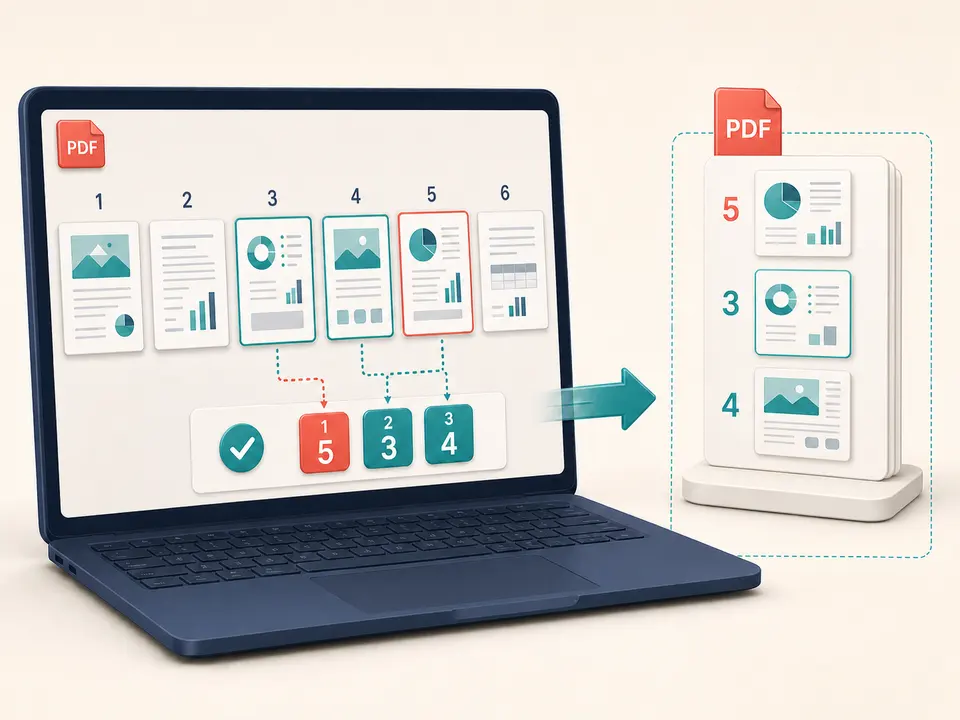
Extract pages from PDF processing opens one source, parses a one-based page expression and asks the PDF engine to copy those page objects into an empty document. Copied pages are appended in the resolved selection order. A range such as 5-3 therefore produces pages 5,4,3 in that sequence rather than silently sorting them upward.
Extract pages from PDF creates one combined result. It does not produce a separate file for each chosen page; Split PDF handles that intent. It also does not remove pages from the source or create an updated full document. Delete Pages describes a discard list, while this page describes the exact keep list for a smaller derivative.
The Extract Pages From PDF source remains unchanged. The result receives a separate filename and contains only copied pages. TiPDF does not infer chapters, detect blank sheets or choose relevant material. Users must inspect the original and define the selection, then verify that context and references still make sense after surrounding pages are absent.
Extract pages from PDF accepts one genuine .pdf up to 100 MiB with no more than 500 pages. The local validator checks its extension, PDF signature and parser readability. Protected documents need authorized unlocking before their pages can be copied.
The Extract Pages From PDF expression accepts all, individual values, comma-separated ranges, descending ranges, odd and even. Examples include 1,4,7-9 and 10-8,2. Values refer to file-page positions and must fall within the actual count. Duplicate values are deduplicated by the shared parser, while the first occurrence and explicit range direction determine order.
Extract pages from PDF output is one file with an extracted suffix. It can contain one page or many, but never pages that were not selected. To save PDF pages accurately, compare viewer page numbers rather than printed labels. Re-serialization can change byte size; extraction is not a compression guarantee.
Decide whether the result is an excerpt, appendix, evidence packet or reading copy. Preserve the complete source separately.
Use the reader's page counter and thumbnails. Note covers or Roman-numbered front matter that make printed labels differ.
Enter pages and ranges in the desired output order. Use descending ranges deliberately and check that every required contextual page is included.
TiPDF validates the expression, copies those page objects into one new document and saves an extracted artifact.
Open the output, confirm its count and order, inspect every boundary and update citations or navigation that depended on omitted pages.
Use Extract Pages From PDF to copy authorized supporting pages into one ordered file while retaining the complete source.
Use Extract Pages From PDF for a self-contained section after confirming distribution rights and including definitions or footnotes the reader needs.
Gather relevant signature and schedule pages into one review copy. This does not verify certificate validity or replace the original agreement.
A descending range can extract PDF pages online in reverse order when a short batch was scanned backward. Review all transitions before relying on it.
Extract pages from PDF copies page objects rather than intentionally rasterizing them, so text, vectors, images, dimensions, crop boxes and rotations normally retain their page representation. Resources are saved into a new document, so size and internal references may differ.
Document-level features need caution. Bookmarks, destinations, attachments, page labels, forms, tags, signatures and links can depend on pages or objects outside the selection. Written references may point to content no longer present. Extract pages from PDF sources only as a derivative, and use specialist validation when accessibility, archival conformance or certificate signatures are required.
The PDF is parsed, copied and saved in browser memory on the current device. This handler does not upload source bytes to conversion, storage, sharing or AI services and does not request remote approval. Standard website resources may still use network requests.
The downloaded excerpt remains on the device and can be easier to share than the complete source. TiPDF cannot remove local files, backups or later transfers. Confirm that every retained page is authorized for the intended recipient and that omitted context does not make the excerpt misleading.
Yes. This local workflow has no checkout requirement, subject to file and page limits.
Yes. All selected pages are copied into one new PDF in the resolved order.
No. Split PDF creates separate files; this page produces one combined result.
Yes. Descending ranges such as 5-3 preserve the direction and produce 5,4,3.
Not through the current shared parser; duplicate selections are deduplicated.
No. It creates a separate artifact and leaves the selected local source unchanged.
Do not assume so. Page content is copied, but document-level structures and certificate validity require separate checks.
Use Split PDF to create individual one-page files, with an optional bundled download.
Delete a validated set of complete pages locally while keeping at least one page in the PDF.
Use Organize PDF for one complete sequence and a single reordered download.
Combine complete PDF files in a deliberate sequence without rendering their pages as images.
Extract pages from PDF capability copy was verified on July 18, 2026 against the local ordered range parser, new-document creation and PDF page-copy handler. Tests cover selected output count, descending order and invalid ranges. Review also compares the artifact's sequence with the requested indexes, confirms that the original file object is not overwritten and checks that one selected sheet can produce a valid one-page result for ordinary review and distribution. These checks address the implemented page-copy path rather than every advanced PDF feature. It excludes semantic chapter detection, duplicated pages, separate-file output, navigation repair and signature guarantees.